Showing posts with label X300. Show all posts

Sunday, July 26, 2015

Tablet Upgrade Time

My digital lifestyle has never really gotten tablet-centric. As much as I wanted to love them, I ended up being the lone holdout in our household. Yes, I would carry my ThinkPad "Slate", Android tablet around on occasion, but more times, than not, I wouldn't use it and even took to avoiding toting it altogether since it was so big and heavy. It turns out that getting the larger (10") class of tablet was a mistake for me. That made it too close to the "ultrabook" class of laptops that I was already using. 

 
At the time that I picked up the tablet, I was using the ThinkPad X300, and over the 3+ years since, I've gone on to the X301, followed by the X1. All of these machines are on, or close to the cutting edge in terms of "thin and light" for notebook computers...... which unfortunately, put the rather "heavy-weight" 10.1" ThinkPad Tablet too close in carry-load. And obviously, one of the very cool features of that tablet; that of the keyboard/folio, became a non-entity since it push the size and weight squarely into the notebook range! Don't get me wrong: the tablet was a very nice example of it's type and it's large IPS display made it and excellent reader and media display. ......But....... there was just not enough of a differentiation between it and my notebooks of choice!
Interestingly, it was the exact opposite usage model of my wife, who's notebook is a ThinkPad T500 with a 15" screen. This machine weighs between 5 and 6 pounds (maybe a little more since it has the extended 9-cell battery) making the difference between it and her iPad Air marked! For her, carrying around the laptop isn't an option, but the iPA really a none issue especially since she quite commonly lugs around a good sized bag with all manner of school teacher stuff in it. So it became pretty obvious to me that downsizing was going to a good answer for my tablet woes.
Now..... if I were a rich man..... (I'll save you the musical quote), I'd buy myself the Sony Xperia Z3 tablet and be done with it. It has a truly excellent (although, non-OLED) display and really nice metal construction giving it a nice thin profile and cutting the weight. It also has the ability to connect to and stream PS4 games from that console. Pretty cool if you own the console.
Think, somewhere between an iPad Air and Mini in size with similar feel. It's NICE!!! Somewhere between $450 and $500 worth of nice. Again, iPad Air comparisons are appropriate, but it runs Android. Yeah right..... now back to the real world of Frugal Propellerheads!
So, that's where this..... the nVidia Shield Tablet: he "poor man's" super-tablet comes into the picture. We can start with the list price being $300. That's not peanuts, but it's $200 less than the Sony for pretty much the same capabilities AND has a few tricks up it's sleeve. OK, I'll put you out of your misery and go ahead an tell you that I gave $185 for mine off of eBay. The seller stated that he was having trouble with WiFi connection, so I took the chance that he either had bad location on his access point location or didn't know what he was doing. I don't have any idea which is was, but I can say, I've had no issues with it at all. Is it the strongest at pulling in a signal? No, but neither is it terrible. I have to switch from one AP to the other when I move to opposite ends of my house, but I have to do with with most of my other devices as well. So yeah..... that's right...... $185!!! That's a pretty good deal in my book for arguably the #2 Android tablet on the market today after the Nexus 9! 
 
I did say "some tricks up it's sleeve" didn't I? A couple of posts ago, I talked about nVidia's Shield concept of being able to stream games. Over the course of the last 3 years, they've grown the concept and fleshed out the product line to include original Shield Portable running the Tegra 4, followed by the Shield Tablet the next year running the K1 processor and this year has seen the release of the Shield Console with the X1. All optimized for gaming with customized GPUs. So, not only do you have a device good at Android games, but the ability to play PC games from your gaming computer, but nVidia's Grid streaming service as well. That's a lot of capability. When you throw in Android emulation apps..... this device is literally "a game changer" (no pun intended)!
Most of you know that I'm not much of a gamer, but the fact is; I'm a sucker for interesting (cool) technology! And this family of products is definitely cool! Plus it's price-point makes it darn near irresistible! I do have another rationale in that I'm the sponsor of our school's computer club. Gaming and gamers are a big part of that. Shouldn't I be fully up to date on that part of the computing world!?!

Thursday, June 13, 2013

Technological Carpe Diem

I'm a terrible person! I had an opportunity so I dump the "love of my life" for another......the X300 for an X301. This is what happened. I had a "contract" in hand for a "new" laptop from one of my old customers (repeat business is awesome). She had just emailed me "out of the blue", stating that she's ready for another computer. The ThinkPad R52 that I sold her 4-5 years ago has been great, but now ready for an updated machine since she's about to start a new degree program this summer. Her needs were the same as before ("Office" type apps, Internet, and a little light photo editing), but she just needed this machine to operate the newer OS (Windows 7, which is what she has at work) and an updated version of Office ....and she had a $300 budget. All that sounded very much like what I do on my X300 which these days sells in the $250 range on a regular basis. So I showed her my machine, which I had upgraded to 4Gb of RAM and a 128Gb SSD vs. the original 2Gb of RAM and 64Gb SSD. We agreed on $285, cleaned up, reloaded with Windows 7 Ultimate 64-bit, MS Office 2010 Professional, and ready to go.
So, this is where the Frugal Propellerhead part comes into play. Now, that I knew I had $285 to work with, I needed to find a replacement for the X300. If you've read this blog for any amount of time, you've probably guessed that I've been researching for the possibility of this situation for some time now. First, I didn't just pull the selling price out of my hip pocket. I knew that the X300 routinely sell for somewhere between $200-300, and that's for a "stock" version with either 2 or 4Gb of RAM and a 64Gb SSD (the 128Gb wasn't available at the time it was introduced). So, an upgraded one like mine would be at the top of the range and that's not including Windows 7 OS much less MS Office. So I knew even if my buyer checked on the pricing, I'd keep my reputation as offering a good product at a good price intact. Secondly, I also knew that I could find X301s selling for between $250 and $350. Therefore, if I'm lucky, or good, then I should be able to buy my replacement for around my X300 selling price.
As it turns out; I was lucky AND good. Last week, I was watching a handful of the X301s on eBay of which I quickly narrowed field down to two likely targets. They both had 4Gb of RAM. One had a 128Gb SSD, but the other seemed to be nicer (it's usually hard to tell from eBay photographs). Besides, I had an almost new 128Gb SSD sitting in a drawer. As luck would have it, I missed on the first (128Gb SSD) which sold for about $230, but didn't feel too bad since the second one didn't appear to have many bidders and it ended at an awkward time of the afternoon on a weekday when most people would be at work. It was at something like $185 when I entered a max bid $235 and won it at $200 even! I'm betting that one of the issues was that the seller set the shipping at a rather high $30, but at $230 total, I didn't much care. I got the machine I wanted at a great price.I upgraded and made $55 in the process! The shocker was when I opened the box and found an almost pristine laptop. 
Why did I go through the trouble of all that work to upgrade to a machine that's basically just like the old one? Other than the fact that's it's newer, more powerful while running cooler; it takes DDR3 RAM. That means I can upgrade to 8Gb for less than half the cost of doing it with DDR2 that the X300 takes. Oh...... and I can't afford the X1 Carbon......yet.......

Which leads us to the history lesson. Other than my love for ThinkPads, I love ultra portables. Above you see a stack of them. Starting at the top, you have the PC110, then the 235, 240, the S30, the X301 and finally, the X1 on the bottom. Over the years you can see that they've basically taken the same volume and kind of Pizza-dough'd-it. Actually, only 3 of the 6 have been available here in North America, with the other 3 being "Japan Only" models, but you get the idea. 
I love undersized laptops. It goes back to the first one I ever owned; the great IBM ThinkPad 701 "Butterfly". You know a design is great when it receives a name.....and when it's immediately ensconced in the Museum of Modern Art! That was only the beginning of this obsession.
It was so bad, I even owned the weird "ugly duckling" twins, the ThinkPad 500, and 510c which were really not very good computers but they were fun .....and small.
Some years later when I was already in the mid-sized ThinkPad stage of my computing life with the T2x series, I acquired a 240e through a trade. It was cool, and small (compare it to the FDD that it's attached to), but seriously underpowered by that time.
However you can see by comparison to some of the other machines of that era, how small it really was.
Then came the "X" rated part of my ThinkPad life: beginning with the X20 (that you see depicted here attached to it's "Ultrabase") which was a work acquisition for departmental travel. Over time, I'd own most of the models in that series including the X21, X22, X30, and two X31s, the last of which is still sitting under my desk. In the more modern idiom, I currently have my daughter using an X61.
Of course, ThinkPads don't have a monopoly on ultra portable innovation. There's the amazing Fujitsu "U" Series that are smartphone sized, and Apple with the iconic Macbook "Air" which just beat the X300 to market. However, I'd have to say that probably the company that got there first, with the least (?) is Sony with the X505! This amazing computer came to market almost 5 years before the similar, was thinner than Air (can you say that?) by quite a bit, and essentially had no competitors in the market.
As for me though; I'm not quite ready to give up the admittedly, rarely used optical drive. This in combination with the "must haves" of the famous ThinkPad TrackPoint and other features such as high resolution display, and it's portability make the X301 the right Ultra Portable for me. Well, and a for profit trade-out doesn't hurt either!


Tuesday, June 11, 2013

Office Monsters!


No, I don't mean that weird guy in the cubicle down the corridor; I mean Giant Monster "Laptops". If you're not acquainted with names such as AVA Direct, Eurocom, Falcon Northwest, and other builders of custom "gaming" notebooks, then this will be something new for you. Remember this name: Clevo. That's it.....just Clevo. This company pretty much is the driving force behind all the various esoteric gaming laptop computer companies all these years, and even the almighty Alienware before that kill-joy Dell swooped in and bought them out.


For years, this little know Taiwanese company has been stuffing essentially desktop hardware into what could loosely be called laptop computers. I say that because the result has generally been north of 10 pounds and with the giant power bricks (literally the size and weight of a real brick), they often push the 15 pound barrier. 
Some of you might remember my little ill-fated foray into the gaming computer world for my son that resulted in the selling off of the modified Clevo, and Alienware parts machines. Although I got my money back out of them, but didn't accomplish what I set out to do, and I still have a bit of a fixation on these giants. In the time from when I was dabbling with these oddities, till the present, things have gone just a wee bit crazy.
 
That's three hard drives depicted in the D900f in the upper picture and that's FOUR fans in the chassis of the new X7200 in the lower picture! That's one for the CPU, one for the chipset and one each for the two GPUs. It's ridiculous, but you gotta love 'em for their shear audacity! 
Meanwhile, as all this was coming to pass on the "portable" gaming front, the "Big Boys" tried to take big mainstream. Dell was first "out the gate" with the Inspiron XPS M2010 ... which, with it's 20" screen was so big; it was it's own case.....complete with handle. 


Of course, HP simply can't allow Dell to do much of anything that it didn't have an answer for; so behold the Hewlett/Packard HDX "Dragon"....with a deck so big they put a well for a remote in it! 
Now, conceptually, the idea was for these things to be "media" PCs with every A/V bell and whistle under the sun. Never mind that nobody wanted to sit in front of a 20" LCD, vs. attaching a media PC to a really big (40" plus) monitor for their A/V enjoyment. Everybody needed to jump on the bandwagon! Here you see one of the Samsung behemouths complete with requisite attractive Korea model that probably couldn't even lift this thing! In the end, it was basically an interlude in the PC business and these things have pretty much gone away. 
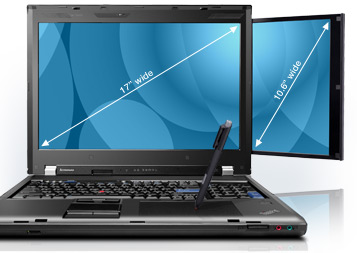
So; what are we here to talk about after all that "rabbit chasing"? The real "monster" of course. Luckily, not the "River Monster" variety which is my wife's current TV show obsession! No, this one is pure ThinkPad. I can't imagine Lenovo being really wild about this concept, which is why it's been killed off fairly quickly after 2 models; W700, and W701. What you see here is the W700DS, standing for dual screen, obviously (more on that later).
 
Here's the deal on these oddities. Five years ago, in 2008, Lenovo released the first of the "W" line, W700, and W500 to act as replacements for the "p" (workstation) versions of the "T" line. The W5xx exists to this day, is pretty normal and therefore uninteresting. Also, it's not nearly big enough to qualify for the "monster" label anyway. Conceptually, the W7xx machines were supposed to do everything that a desktop machine would do, but have an attached monitor and be closed up and moved (sort of). 


One of it's more interesting ideas was to make it a photographer's mobile digital darkroom, complete with automated color calibration for the monitor and an optional built-in Wacom digitizer pad complete with an active pen tucked away in a silo in the side of the machine. 


To give you an idea of how large it actually is; that's an X300 (13.3" screen) it's next to in the upper image and an X61 (12.1" screen) sitting in it's "lap" in the lower image. Inside the giant chassis are 2 hard drive bays capable of taking and configuring two hard drives into a RAID set. 
It's so big, that even the "Mini-Dock" made for it is big! The CPUs in them can range from the fastest of the Core2Duo series to the Core i7 processors. The last of the models could take powerful nVidia Quattro GPUs and up to 16Gb of DDR3 RAM. The 17" screen can range from 1440 x 900 all the way up to 1920 x 1200, plus a 10.6" pullout screen of 1280 x 768 resolution. Fully equipped, it was upwards of 11 pounds and cost in excess of $5500! Surfice to say, I'd love to have one. Over the years I've tried a number of times to develop a powerful "mobile workstation", beginning with the T4x series, then Z61m, and now T6x machines. However, I've never been fully happy with the results and now that the lower end of the W700s have dropped into the sub-$500 range, they are starting to get my attention. 
 
Maybe, like the "River Monsters" guy, I can land one for myself someday. But then again, there's the really cool Asus G73.....


Sunday, December 16, 2012

The Other Side of the Great (Technological) Divide

This is the consequence of crossing the technological Rubicon that I posted on a while ago. The other day, I found myself discussing and defending the ThinkPads that we're issued at work. I was part of the first group of teachers when the school district made the decision to move from desktops to laptops and was issued a ThinkPad R60. We were told at the time, the "cycle" would be 4 years which is going to be typical and understandable for a money-strapped public entity like a school district vs. a corporation (typically 3 years). Unfortunately the cycle went to 5 years which isn't good, but workable for a machine running XPP. After all, the mission of these machines was to do "office" type applications, email and browser oriented functions. These were dual core machines and could handle those tasks well, however, the powers that be in charge of sourcing and spec'ding these machine are.....shall we say.....lacking in expertise with hardware? Which is where I'm going with this post. It's not a rant regarding them (although their lack of understanding in this area given their jobs is inexcusable), but more so a general issue that's out there among most if not all buyers. I'll just point out that they ordered them with 512Mb of RAM and 40Gb HDD.
We are an "Ebook" school, meaning that the district made the decision some years ago to purchase computers for issue to students and attendant electronic versions of the text, vs. physical books. Given the price, weight and rapidity of change in texts in today's world, it looked to be the right decision. Although ultimately this project is doomed to be abandoned (partially due to circumstances beyond anyone's control), lets just say that the implementation was lacking from the get-go. As most anyone who's worked in a corporate environment knows, the implementation of security software is enough to significantly slow down any computer, so certainly they don't need to be further hampered by being purposely crippled in the ordered specifications! 
Three year ago when I moved to the High School, I was duly impressed by the fact that the issued computer to the students were the ThinkPad X200. And for those who aren't familiar with this model, it's basically a shrunken X300 without an optical drive at half the cost! One day, after listening to the students complaining about the slowness, I decided to look at one. I was horrified to find that it was equipped with 1Gb of RAM! Thinking that this was a mistake or that someone had taken out one of the modules, I checked another.....same thing.....then another......same result. To say that I was a little stunned would be putting it mildly. In fact, I got onto the ThinkPad Forum and had a prolong discussion with other members about why Lenovo would even sell a crippled machine like this, customers' wishes not-withstanding! My contention is that just in our district alone, there are over a thousand people who will have the belief that ThinkPads are horrible computers and would never buy another Lenovo product!

OK; I know that so far, it sounds like a "rant", but it's not really. Although, the "professionals" who's jobs it is to purchase those machines are clearly idiots (yes, I know that a little strong, but they are being paid for their expertise), this is a common issue among most computer users today. Most folks simply don't understand what makes a computer "feel" fast or slow. Yes, corporate (or school district) security is an issue, but you can talk memory with people all day long and the vast majority wouldn't know the difference between RAM and storage to save their life. The fact of the matter is that most any computer made within the last 3-5 years will happily run a modern OS (eg. Windows 7) and it's basic apps if given the correct amount of RAM. My "rule of thumb" is to double whatever Microsoft lists as recommended.....then double that every time they come out with a major service pack. 
 
A good example was what happened with Windows XP. It was originally designed to run on 256Mb of RAM. By the time that Service Pack 3 came out, it needed to have 2Gb to run well. So it basically went like this: 
  1. Windows XP- 256Mb of RAM
  2. Windows XP SP1- 512Mb of RAM
  3. Windows XP SP2- 1Gb of RAM
  4. Windows XP SP3- 2Gb of RAM
 
With Windows 7, I've set a 2Gb floor and have really only run 4Gb or better on our own machines. However, within the last year, another dynamic has come on the scene. The all-conquering solid state drive (SSD for short). This along with a adequate amount of RAM has become the main ingredient in making a machine feel fast. Boots happen within 15-20 seconds, programs launch instantly and files are accessed almost immediately.
  
The correct combination of these devices can make the sweet-spot of the 3 year-old notebook computer a perfect storm of functionality. Take any corporate level computer of this vintage, ranging from the Dell Latitude E6400 that I've been buying up for clients to the X61 that's destined to be my daughter's replacement for the aging X30 (yes, that's right.....a PIII-M machine). Combine these computers with 2 to 4Gb of RAM, an SSD (stirred, not shaken), add Windows 7 and anyone can have themselves a very nicely functioning notebook for around $250, or less.
Which gets me down to my last point. Our school district finally got it's wits about itself and started buying machines with adequate RAM. The L420 that was issued at the end of last year has 4Gb of  RAM on board. However, this machine is far outperformed based on "feel" day-to-day by my 3 year old X300 and the 4 year old X61 equipped with the same amount of RAM and a SSD!