Showing posts with label Alienware. Show all posts

Wednesday, May 19, 2021

Gaming Laptops? ....... Really!?!

It's the Asus ROG Zephyrus G14. If you've followed my writing at all, you'll know that I don't do gaming laptops. It's just not a part of my ethos, particularly buying them new. Yet, here I am talking about not only a gaming laptop, but a current model as well. So what's the deal on this? 

The last time (the only time) I delved into the gaming laptop world was back several years ago when I got my hands on a Clevo D900 era machine that was in stripped and in bad condition for next to nothing. It didn't turn out to be a big win, but I did learn a lot about gaming machines of that time. Clevo, if you didn't already know is an OEM builder and doesn't really sell much under their own brand. Back then, gaming laptops were well and truly a niche product. Even Alienware OEM'd their machines from these guys! There was a lot of desktop or desktop derived hardware in these things and they were big, super-heavy and generally ran for less than an hour on battery power. And they were all like this....

Of course, this was back in the days of the HP HDX "Dragon", and the Dell XPS M2010 which were true "beast"; less laptops or mobile computers, but desktops that closed nicely! My, how things have changed!
Oh, don't get me wrong, big and crazy hasn't gone away. There's The Acer Predator, and the MSI Titan lines. But mostly today's gamers don't have to go to extremes to get excellent performance. That's where I arrived recently. What was I doing here? This is the story..... My daughter's boyfriend is a graduating senior and intends on being a computer science major. And since our school district has provided students with devices so he doesn't have his own up till this point. So.... what does a future CS major need in terms of a computer for the next several years. As it turns out, a decent gaming machine will be just fine for that. It will have enough memory to run virtual machines so that any OS necessary for coding can be accessed and have a monitor panel with enough resolution to see a good number of lines of code. However, for a college student to go to class and meet for group projects, they sure don't need/want something huge and difficult to carry around. And to survive the next several years of work and being carried around, he'll need something well spec'd and built.
And that's where this comes in; the Asus ROG Zephyrus G14. Small enough to be decently portable, with a Ryzen CPU and other very decent specs to last awhile. So, with modern hardware and nice design, gaming machines do have other uses.


Tuesday, August 30, 2016

The Right Tool for the Job: A Lenovo IdeaPad Y560p

Last summer (2015, not 2016), I had a job to do. My son was going into the 7th grade and needed to carry a computer with him pretty much every day. The alternatives up to that point was to check out an ancient ThinkPad X61, complete with 1Gb of RAM out from school, or carry his 6+ pound, ThinkPad T500. So it was pretty obvious that those weren't good options! As you can see, I came up with a different answer in the form of an X220. It had an i5 "Sandy Bridge" CPU, 4Gb of RAM. Pretty good for $59. I put in another stick of RAM to get it up to 8Gb and installed a 120Gb Intel SSD in it and he was set to go. 
A year later..... this happened. Our school system decided that they'd issue and mandate the use of Chromebooks. BYODevice..... dead and gone. So, now a-days, I often see my son trying to play Minecraft or Terraria on the 12.1" screened X220. Even though, those games aren't particularly taxing to the integrated GPU of the Sandy Bridge i5, it was definitely not an optimal solution. 

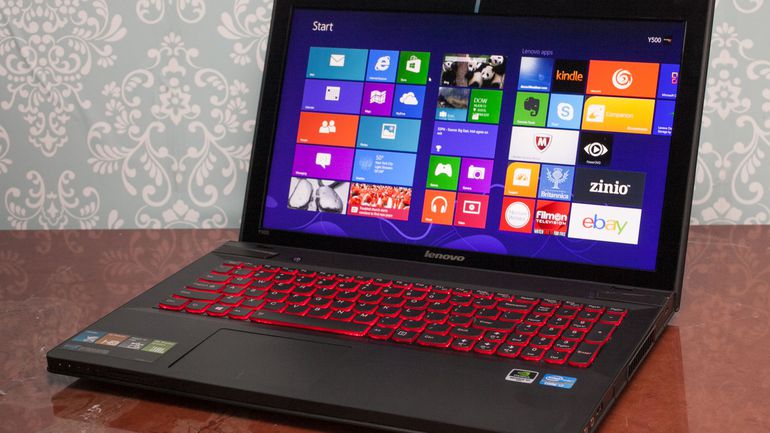
So, over the course of the last month, I've been researching gaming machines that were a few years old..... along the lines of the "Sandy Bridge/Ivy Bridge" era. There was of course, the quintessential gaming machines of Alienware such as the M14x and the less expensive Lenovo IdeaPad "Y" Series among the ones I looked at. I set a budget limit of $300, so that eliminated all the Razer Blade machines and most of the newer Alienwares as well. But I was still interested in those, since on occasion, an older model can be found (often needing a little work) in the high $200. However, it was the Lenovos that really interested me. While I'm very familiar with their ThinkPad line, I'm the exact opposite on their consumer machines. What I found was that they've developed a decent reputation on selling capable gaming equipment at reasonable prices. There's no multi-colored keyboards and air vents, or super-cool MacBook looking machined aluminum cases, but they did bring the goods in the hardware department.
Although I had originally started looking at the IdeaPad Y500 and Y510p (I'm an optimist), I came across a Y560p on eBay that just wasn't getting any love! It's bidding price sat at around $50 for a long time, until it finally edged over $100 at the end. I paid $102 with $12 shipping. So for less than $115, I have my son's next machine. What is it and why did I hone in on that model, other than for the price that is....
When examined; it's not particularly remarkable for a 2010 machine. It wasn't impossibly thin like the Razer, or crazy cool looking like the Alienware. It did have some chops on the hardware front though:
  • Intel i7-2630QM "Sandy Bridge" CPU
  • DDR3 RAM 1333 up to 8Gb
  • AMD Radeon HD 6570 GPU with it's own 1Gb of memory
  • 15.6" WXGA (1366 x 768) display
Those specs are decent, with the exception of the screen resolution maybe, but there's a little something that's hidden under the skin which really helps. If you look closely at the motherboard up at the top, you'll see 2 PCIe/mSATA sockets. One is not only full-sized, but capable of taking mSATA devices.....
Which means this! I like using mSATA spec'd SSD storage. It allows a machine to have the benefits of solid state storage for things like the OS while keeping a traditional mechanical hard drive in the 2.5" SATA bay for mass storage. The smaller ones like this 128Gb Micron can often be found in the range of $25-35. That'll make the machine feel snappy while not having to spend a lot of money on buying a bigger (eg. 256Gb, 512Gb) SSD. 
Warts? Sure..... I don't like that there aren't USB 3.0 ports, really dislike low-res monitors in general or the shiny plastic deck. Otherwise; it's pretty OK. It's going to be my son's computer anyway, not mine!

Thursday, January 14, 2016

Family Portrait 2016: Part 2, Personal Computing

It is 2016! We each have personal computers! Actually, I should say, "devices", since we all have more than one and they aren't all computers in the sense that most people understand them. There are 4 of us, and we all have at least one notebook (aka Laptop) computer, and one tablet. I'll get back to the "at least" part a little later.

In today's world, it's the notebook computer that's the typical product and it's the desktop that's a specialty item. Now that our children are at or close to teenage years, we all have uses for an actual computer. The last holdout was the daughter who started on a notebook computer playing games both online and locally loaded. But then, she went completely iPad oriented when she received her first one a couple of years ago. Last month, she announced to me that she intended on putting a "computer" on her Christmas List. I told her to take it off because, in our family, those are "regular use" items and not something special. WOW, what a different technological world a few years have made! Her reason was that she wanted to have her own Minecraft account, so didn't want to share with her brother! Anyway, that get's us to our current situation. We all have a "main" machine that we work on. 
 
My son has gone through a series of various ThinkPads back to an IBM (!!!) ThinkPad A21p, many moons ago! Every couple of years, he's gotten an upgrade just as soon as somebody else upgraded from a machine that was too old and slow for their use. Of course, they've always been ThinkPads with the exception of my ill-fated foray into old gaming laptops first with a Clevo, that followed by an Alienware. Then, back I went, to the faithful ThinkPads, generally of 15" screen size because he mostly used them to play games on at home, till this the current school year when he started the 7th grade and needed to carry a machine back and forth. So, now he has a ThinPad X220 that's compact, thin, light and plenty powerful enough for doing PowerPoints, Google Docs and light research on the web..... oh, and the every-present "flash-games" that all middle school kids play! Minecraft has moved over to a "self-built" (me, not him) gaming box that got it's start from my brother sending an ASRock, Mini-ITX board populated with a second-gen Intel "Core" i5 processor. Eventually, it received my old third-gen i5 processor. Today, it does a nice job equipped with that, an Intel SSD, and an nVidia GTX 650 graphic card (so it can stream to nVidia Shield devices). More on that later as well. We have it hooked up to the new Sony 55" 4K TV in the game/media room. 
His "personal" device, is the nVidia Shield Tablet. It has a nice 8" IPS screen, a powerful K1 Quad-Core processor and capable of streaming games from his gaming machine since that has certain level nVidia graphic card in it! He loves it when he's not "on restriction" from not keeping grades up to snuff! If you haven't read my earlier post on this thing, I'll go over the high-points quickly here. Other than the typical Android type things, and the game streaming that it can do, it also has a dedicated gaming controller as well, plus the capability to connect to an outboard monitor via HDMI and function as a "console". It's really a pretty slick concept and nVidia's execution is very nice.
 
On to the daughter. She, like her brother started her computing life via ThinkPads. In her case, custom (by Daddy) painted lavender, X31. That was replaced by a ThinkPad Z60t.....right around the time she got an iPad. The rest (the laptop too).... as they say; was history. That is, right up until last November, when she decided she needed her own machine so she could have her own aforementioned Minecraft account.

Then, she (I) got lucky! I had a friend who had a Sony VCPEH, a decent 15.6" screen "desktop replacement" of the "Sandy Bridge" Core generation. It was brought to me with an apparently dead screen/video sub-system to retrieve files. Indeed, the screen refused to light up regardless of what I did. However, it did output to an external monitor indicating the GPU was still good. They had already bought a new machine and didn't want the computer back after I got their files off. So it sat under my desk for several months then in a box due to our move to the new house. When I started looking into my daughter's request, it occurred to me that maybe I could just replace the panel on this Sony. This required me to take it apart so I could see the model number. When it went back together, the screen came back to life! This was followed by me digging into my parts boxes for more RAM, and a drive. So now she has an i5, with 8Gb of RAM, and a 160Gb Intel SSD. Like a certain overgrown elf, Daddy wiggled his fingers and made a computer appear.
Then there's my wife. And since I just recently wrote about her machine, I'll just quickly recap here. Several years ago, I talked her into a second-hand iPad (1st gen) because I knew of one I could get cheap. That was like 10 of these things ago! For me, they've been like the episode of the classic Star Trek, "The Trouble with Tribbles". They just keep multiplying! There is of course, her progression through the generations of these things. That was followed by the expansion into "kid territory" when the children were both elementary school age because Mom had them using apps to suppliment their school learning. All of that was part of the greater issue; that of her starting to use them in the classroom with her students. This grew into a full-scale conversion from a set of old ThinkPads to "older" iPads, and now to iPad Minis. We're up to 5 Minis (not counting my daughters) and one iPad2. Oh, and my wife is now on a 1st gen iPad Air.
 
Comparatively, her notebook computer progression is rather simple. She uses, mid-sized (15") ThinkPads. I typically get her something in the "T" Series, although, she's had "A"s, as well as "Z"s. We are how literally in the middle of moving her from a T500 to a T530. I've had SSDs in her machines for some time now. The newest machine has a 480Gb, Intel 2500 with 8Gb of RAM. Otherwise, the machine is unremarkable, but completely adequate for her needs. She hates it every time I do it, but I upgrade her about every 2 to 3 years as you can probably tell by the model numbers of the latest round. She swears it's more often, because I tend to reload her OS every year in between.

As for me; I just wrote about that issue a couple of days ago, so won't repeat it here other than to say that I'm going to talk tablets soon.

Sunday, May 4, 2014

The Frugal Alien: Planing and Negotiating

When last we left off on the Frugal Alien episodes, we were examining the concept to see if there was a way to build a computer with an Alienware look, but not the price. My research into the subject has yielded 2 design "lines" within the relatively modern era. What we've discarded are the really ancient "tall tower" designs, and the current X51 shrunken mini-gamer chassis.
Unfortunately, I've also had to discarded my personal favorite; the Area-51 ALX chassis of 2009. They just didn't sell enough of them for very many to be out there in the market and therefore, simply too expensive. What we ended up with are the Aurora R1 through R4 of relatively recent vintage. That's the design with the sliding front drive cover (post-Dell buyout), and the iconic 7500 with the swinging drive-bay door. Although older and lacking in the really sophisticated LED lighting, these are considered to have the classic (pre-Dell) Alienware look.
Classic or next gen Cool? Weeeelll...... there's more to it than that. Oh yeah: they tend to run about the same price used. Soooooo......
 Aurora 7500
Aurora R4
If you'll take a minute and look at the insides closely, you'll see that the R4 (R1-4, actually) only has room for a Micro-ATX, motherboard. Duoooooohhhhh! Yes, I'm aware that there are several boards ranging from very decent to downright top notch in that form-factor, but there aren't nearly as many. And what does that translate to in the market? That's right......higher prices (on average). Sure, I'd be happy to build on an Asus Maximus IV or even the Gigabyte GA-Z77mx, but I can routinely find way more of the equivalent ATX sized boards at a generally lesser price-point. So there: decision made. 
Well actually, that wasn't all there was to it. There's the cool factor and the sliding door and Alien FX lighting has that in spades. However, not too long ago, I ran across a video where a guy "modded" an Alienware 7500 ALX case to a matte-black/carbon fiber look with paint and rubberized shelf-liner. Now, THAT'S COOL!!! So, this is the direction that we're probably going to go.
There's more of course. As a result of all this discussion, I've been keeping track of how much these cases cost on eBay (mostly). Besides learning that the 7500 and R1/2/3/4 cost about the same ($150-200 after shipping), I also learned that a careful shopper can sometimes get a machine with "issues" for about the same costs as just a bare case. This adds a new wrinkle to the situation, in that it allows for the possibility of being able to use the machine at minimal additional cost by replacing defective part(s) while accumulating funds for new ones. It started with a local machine on Craigslist, but it was sold before I could contact the seller. However, last week, I found an identical machine on eBay that was showing gibberish on the POST screen. Of course, it could very possibly be a major part such as the motherboard, but that's doubtful for this symptom. In all probability, it's the graphics card failing. Unfortunately, my student wasn't ready and didn't have the $200 it didn't sell at! So I contact the seller to see if he was going to relist it, consider having a "Buy It Now" price. And as is often the case, he answered back that he was going to relist it, but if he was to put in a BIN, was there a $$$ that I'd be willing to pay? At this point, we are going back and forth trying to get the "all-in" (including shipping) price below $200. That would be very cool and a good start to Project "Frugal Alien". So, stay tuned.

Monday, April 14, 2014

Is There A Way to Make An Alienware Frugal?

In might be one of the most improbable of all the improbable success stories in the computing industry. I know I've railed against it in the past, and banged my head against an expensive failed M7700 project. The fact of the matter is that they (now a part of Dell) are ridiculously expensive for what you get. In fact, you don't have to build your own to get a better deal. You can in fact find any number of manufacturers out there that'll sell a you a better deal. However, there's just a little something about them that draw people. Kind of like owning a Jeep product. It's expensive and doesn't make sense, but they are still a success. In fact, while I was looking through Youtube videos, I came across a guy who collects Alienware desktops! This nut has something like 5 or 6 of them, mostly less then 4 years old, so you can imagine how much they costs him!
What started this weird (for me anyway) post? In fact, there's nothing frugal about this firm that makes it's money completely due to cache, and not on substance. Well, it's a weird story. This, like most other years, I have a student who's not only good at my class, but also are interested in things that I'm interested in...., however, oddly, this year.....it's a girl! It's rare, since the top history students at this age tend to be boys, and of course, interest in computers, doubly so! She and some other students have decided to start a Computer Club at our school. As part of that, she wants to build her own computer. .....Not just any computer, a Gaming Computer! One that will make her teenage younger brother jealous!
Let me make this clear. We live in the "burbs", but not the type where there are Mercedes in driveways and pools in every other back yard. The percentage of residents with college degrees is in the low 20's, so yeah, it's pretty much working class. So, the probability of a parent (in the case, a single parent) will pony up for a $3000-5000 PC isn't good. So, we'll need to be inventive and look at alternatives. Right up my alley!
One of the things I do like about Alienware is that regardless of how unusual the exterior, they seem to basically use regular parts on the inside. I watched a Youtube video where a guy took an older model and updated it by replacing the motherboard, etc. PING! ....Which is precisely what I think can be done with my student.On top of that, I even came across a great candidate for it this weekend! I found an ad on Craigslist for an Aurora 7500 (Core2Duo generation) model that the owner had pulled the processor, and RAM, but everything else intact for $175. I'd bet that he'd take somewhere between $150 and $160 for it, but even at the full price, it'd be a decent starting point for her till she can save enough to upgrade the guts.
From there, it's a series of incremental upgrades till she'll eventually have a decent gaming rig..... all without outlaying huge chunks of cash (at least for a 16 year old) at a time. 

Much of the cache of Alienware is that they are just "cool". However, the concept would be all the more cool if it can be frugally and successfully done! Stay tune to see if I have better luck with these guys the second time around!

Tuesday, June 11, 2013

Office Monsters!


No, I don't mean that weird guy in the cubicle down the corridor; I mean Giant Monster "Laptops". If you're not acquainted with names such as AVA Direct, Eurocom, Falcon Northwest, and other builders of custom "gaming" notebooks, then this will be something new for you. Remember this name: Clevo. That's it.....just Clevo. This company pretty much is the driving force behind all the various esoteric gaming laptop computer companies all these years, and even the almighty Alienware before that kill-joy Dell swooped in and bought them out.


For years, this little know Taiwanese company has been stuffing essentially desktop hardware into what could loosely be called laptop computers. I say that because the result has generally been north of 10 pounds and with the giant power bricks (literally the size and weight of a real brick), they often push the 15 pound barrier. 
Some of you might remember my little ill-fated foray into the gaming computer world for my son that resulted in the selling off of the modified Clevo, and Alienware parts machines. Although I got my money back out of them, but didn't accomplish what I set out to do, and I still have a bit of a fixation on these giants. In the time from when I was dabbling with these oddities, till the present, things have gone just a wee bit crazy.
 
That's three hard drives depicted in the D900f in the upper picture and that's FOUR fans in the chassis of the new X7200 in the lower picture! That's one for the CPU, one for the chipset and one each for the two GPUs. It's ridiculous, but you gotta love 'em for their shear audacity! 
Meanwhile, as all this was coming to pass on the "portable" gaming front, the "Big Boys" tried to take big mainstream. Dell was first "out the gate" with the Inspiron XPS M2010 ... which, with it's 20" screen was so big; it was it's own case.....complete with handle. 


Of course, HP simply can't allow Dell to do much of anything that it didn't have an answer for; so behold the Hewlett/Packard HDX "Dragon"....with a deck so big they put a well for a remote in it! 
Now, conceptually, the idea was for these things to be "media" PCs with every A/V bell and whistle under the sun. Never mind that nobody wanted to sit in front of a 20" LCD, vs. attaching a media PC to a really big (40" plus) monitor for their A/V enjoyment. Everybody needed to jump on the bandwagon! Here you see one of the Samsung behemouths complete with requisite attractive Korea model that probably couldn't even lift this thing! In the end, it was basically an interlude in the PC business and these things have pretty much gone away. 
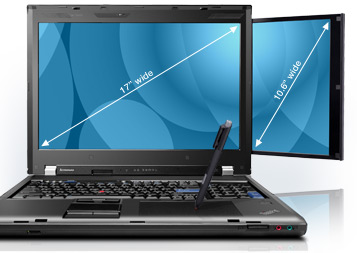
So; what are we here to talk about after all that "rabbit chasing"? The real "monster" of course. Luckily, not the "River Monster" variety which is my wife's current TV show obsession! No, this one is pure ThinkPad. I can't imagine Lenovo being really wild about this concept, which is why it's been killed off fairly quickly after 2 models; W700, and W701. What you see here is the W700DS, standing for dual screen, obviously (more on that later).
 
Here's the deal on these oddities. Five years ago, in 2008, Lenovo released the first of the "W" line, W700, and W500 to act as replacements for the "p" (workstation) versions of the "T" line. The W5xx exists to this day, is pretty normal and therefore uninteresting. Also, it's not nearly big enough to qualify for the "monster" label anyway. Conceptually, the W7xx machines were supposed to do everything that a desktop machine would do, but have an attached monitor and be closed up and moved (sort of). 


One of it's more interesting ideas was to make it a photographer's mobile digital darkroom, complete with automated color calibration for the monitor and an optional built-in Wacom digitizer pad complete with an active pen tucked away in a silo in the side of the machine. 


To give you an idea of how large it actually is; that's an X300 (13.3" screen) it's next to in the upper image and an X61 (12.1" screen) sitting in it's "lap" in the lower image. Inside the giant chassis are 2 hard drive bays capable of taking and configuring two hard drives into a RAID set. 
It's so big, that even the "Mini-Dock" made for it is big! The CPUs in them can range from the fastest of the Core2Duo series to the Core i7 processors. The last of the models could take powerful nVidia Quattro GPUs and up to 16Gb of DDR3 RAM. The 17" screen can range from 1440 x 900 all the way up to 1920 x 1200, plus a 10.6" pullout screen of 1280 x 768 resolution. Fully equipped, it was upwards of 11 pounds and cost in excess of $5500! Surfice to say, I'd love to have one. Over the years I've tried a number of times to develop a powerful "mobile workstation", beginning with the T4x series, then Z61m, and now T6x machines. However, I've never been fully happy with the results and now that the lower end of the W700s have dropped into the sub-$500 range, they are starting to get my attention. 
 
Maybe, like the "River Monsters" guy, I can land one for myself someday. But then again, there's the really cool Asus G73.....