skip to main |
skip to sidebar
A few years ago, Lenovo decided that it needed/wanted to shake up it's ThinkPad Line some. Enter the ThinkPad Edge, range of notebook computers. I was only mildly interested since I rarely if ever dabble in the lower end of their offerings anyway. Never the less, the Edge machines were on the edge (unintended pun) of my awareness, but remained there until very recently.

Other than eBay, I often go to Goodwill's online entity, which is called "shopgoodwill.com". Mostly, I go there to find old, obscure cameras for my little collection. Sometimes, if they aren't well known (such as Petri, Fujica, Yashica), or unpopular (Minolta, Konica) they can be had cheap. And cheap is right up my alley! I don't have expensive things in any of my collections. On occasion, I'll look at computing equipment there as well, and sometimes I'll even find something that's the right combination of interesting and inexpensive. One caveat for any of you who are thinking of trying it out. Their shipping charges tend to be on the high side.

On this occasion, this is what appeared to grab my attention. OK.... not literally, this machine, but one like it; a ThinkPad Edge 15, which is appropriately enough, a notebook computer built around a 15.6" screen. The most generic size of notebook computers being sold today. I have 4 dead computers of that screen-size sitting in my office right now. What really got my attention was that it was receiving very little action even, though the price was cheap and it was relatively new (Arrandale Core generation). It came in at $34.08 with about $15 cost for shipping and arrived at my house under the magic $50 "impulse buy" mark! The reason an i3 Core machine from a major manufacturer was less than $50?


There ya go. I'm not even going to bother you with the image showing the hole where it continued into the screen. Why, someone would choose to take a machine out of service by drilling a hole through it is beyond me! But like I said, I've got several of that size screen and similar vintage sitting in my office waiting for disposal. Given the price-point that this machine sold at, I was betting that unlike, real ThinkPads, these were made up of rather generic parts with some ThinkPad like part(s) grafted on (e.g. TrackPoint, ThinkPad badge), and sold basically as a marketing ploy!
Yup; sure enough..... when I got the thing apart, it's construction, layout and design was almost completely identical to the Lenovo IdeaPad that I recently bought my son. So; you're thinking: you threw $50 down the tubes to prove a point!?!
You guys are probably aware that I'm a sneaky bugger and had something up my sleeve..... and you'd be right. A working relatively recent (less than 5 years old) notebook computer is typically worth something like $150. One carrying a well-known and respected name is generally worth a little more. If it has a recognizable performance buzz-word labeling associate with it.... say "Intel Core i5", then that's even better.
Through the magic that is eBay, I bought the following:
- ThinkPad Edge 15 motherboard (without the hole feature)- $25
- ThinkPad Edge 15 display cable (also without the hole)- $4.95
- Intel Core i5-520m CPU- $8.25
From my the amazing Frugal Propellerhead Scrapyard:
- Working 15.6" WXGA screen (again, without the hole)- $0
- 120Gb HDD- $0
Which brings the whole exercise to just south of $90 spent. I may sell it, or maybe use it as a "spare/loaner" machine. Who knows; but now I know more and got to spend some good fun time this last weekend.
There's lots of choices out there for server operating systems..... much of it free! Some of you might remember that last year I did an experiment using one of my old ThinkPads (an A31) to build a "proof of concept" for a Portable Server. I used an older distro of CentOS, installed several random drives into it's UltraBay and the one in the 2631 Dock as well. It all went fine, and the thing works. However; at the end of the day, it's still an old P4 computer that interfaces with drives via IDE, and there-in lies the issue. Well.... that and the fact that it's P4 is a single core processor and most OS's these days require a dual core. Oh yeah; there's also 2Gb limitation on RAM which pretty much eliminates anything like FreeNAS using ZFS.
So, if I want to go FreeNAS, which by the way is what I use at home, I'm going to have to do something about using hardware up to snuff. Duel Core, processor and at least 4Gb of RAM, maybe more.
The other direction I could go is to pull out my copy of MS Windows Home Server 2011 of which I own a license. Doesn't need as much RAM, but has other demands. So, let's look at the candidates to replace the A31.
In one corner, stands my old ThinkPad Z61m. It has a T7200 Core 2 Duo processor and the ability to have 2 drives onboard. It's really a nice machine complete with titanium LCD lid that's beautiful and unique. However, a quirk of that generation's chipset is a memory limitation to 3Gb regardless of what the RAM sockets have in them!
And in the other is the new-comer, an R500 that I was given this last summer. For some of you who don't deal with ThinkPads on a regular basis, they may seem very similar, but conceptually here's the difference that we're dealing with. If the Z61m is a BMW SUV, the R500 is a Chevy Suburban...... with bench seats! You might be able to see that it's so chunky, that the USB ports are standing on their sides! This machine can also take 2 drives internally, but you can get 8Gb of RAM in it.
I guess what it'll come down to is this. If I want to go with FreeNAS, then it's a no-brainer. I go with the R500. Max out it's RAM, put two drives in the SATA bays and the OS onto a USB stick. Attach one or more external drives and call it a day. However, if I do Windows Home Server; I'll use the Z61m. The 3Gb of RAM isn't really an issue, put a system drive of 160Gb in one bay and a bigger drive in the other one for storage as well as USB or Firewire external drives.
Which then brings on the deciding factor.....networking. Which OS is going to be friendlier as a stand-alone system and be able to server files creating it's own network.
Sometimes I feel like the closet in my office is this; where the toys are various old ThinkPads and ThinkPad parts. The other computers...... Dells, HPs, Toshibas.......? Yeah, they get sold off, if they are of the slightest value, given away if anyone at all wants it or thrown out otherwise. In my world, ThinkPads only, are good enough to occupy the precious little crevices under, between and on top of the other stuff!
I also don't mean my small (and I mean that literally, consisting of 3) collection of classic ThinkPads, a 701c, a 765xd, and an X20. No, I mean relatively recent vintage machine.... although, I did dig out a couple of things that will go in the museum; the WorkPad C505/C500 and 1st gen, ThinkPad Android Tablet.
I mean more along the lines of these machines.
e.g. at least of the Core/Core 2 Duo generation. These are all usable in some way or have their parts harvested for use. My question becomes: what do I do with these things?
I've so far, been unable to convince the powers-that-be to let me and my machines go up in the International Space Station, although they appear to have enough of them already!
Lenovo thinks that something like this would be a good idea. My wife says otherwise.....
I lean towards these sorts of projects, but one can only have so many computer photo-frames and yellow T60s.....
If my imagination/skill-set was better, it might be things like this....
Last year, I did the "turn an A31 system with 2631 Dock in a server" thing using CentOS, but that concept has been proven and I failed to find a practical use for it...... at least in my world. So now what?
I can do that all over again using the now, rather long-in-the-tooth Z61m with the gorgeous titanium lid into a mobile server and since it has a dual core processor, I can even use the languishing MS Windows Home Server 2011 license that I have sitting around.
I could use either that, or the also sitting under my desk gathering dust cousin, the R500. It's another member of the "Team-Too-Chunky-To-Travel-Well" category! However, the R500 is of the Penyrn generation, and thus newer and more usable for other pursuits.
Then there are the others (no, this isn't my pile.... at least, not yet) that a project isn't so imminent....
Last summer (2015, not 2016), I had a job to do. My son was going into the 7th grade and needed to carry a computer with him pretty much every day. The alternatives up to that point was to check out an ancient ThinkPad X61, complete with 1Gb of RAM out from school, or carry his 6+ pound, ThinkPad T500. So it was pretty obvious that those weren't good options! As you can see, I came up with a different answer in the form of an X220. It had an i5 "Sandy Bridge" CPU, 4Gb of RAM. Pretty good for $59. I put in another stick of RAM to get it up to 8Gb and installed a 120Gb Intel SSD in it and he was set to go.
A year later..... this happened. Our school system decided that they'd issue and mandate the use of Chromebooks. BYODevice..... dead and gone. So, now a-days, I often see my son trying to play Minecraft or Terraria on the 12.1" screened X220. Even though, those games aren't particularly taxing to the integrated GPU of the Sandy Bridge i5, it was definitely not an optimal solution.


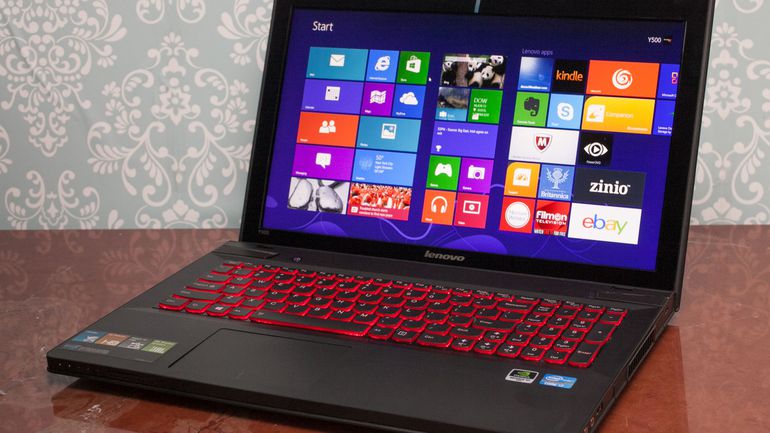
So, over the course of the last month, I've been researching gaming machines that were a few years old..... along the lines of the "Sandy Bridge/Ivy Bridge" era. There was of course, the quintessential gaming machines of Alienware such as the M14x and the less expensive Lenovo IdeaPad "Y" Series among the ones I looked at. I set a budget limit of $300, so that eliminated all the Razer Blade machines and most of the newer Alienwares as well. But I was still interested in those, since on occasion, an older model can be found (often needing a little work) in the high $200. However, it was the Lenovos that really interested me. While I'm very familiar with their ThinkPad line, I'm the exact opposite on their consumer machines. What I found was that they've developed a decent reputation on selling capable gaming equipment at reasonable prices. There's no multi-colored keyboards and air vents, or super-cool MacBook looking machined aluminum cases, but they did bring the goods in the hardware department.

Although I had originally started looking at the IdeaPad Y500 and Y510p (I'm an optimist), I came across a Y560p on eBay that just wasn't getting any love! It's bidding price sat at around $50 for a long time, until it finally edged over $100 at the end. I paid $102 with $12 shipping. So for less than $115, I have my son's next machine. What is it and why did I hone in on that model, other than for the price that is....
When examined; it's not particularly remarkable for a 2010 machine. It wasn't impossibly thin like the Razer, or crazy cool looking like the Alienware. It did have some chops on the hardware front though:
- Intel i7-2630QM "Sandy Bridge" CPU
- DDR3 RAM 1333 up to 8Gb
- AMD Radeon HD 6570 GPU with it's own 1Gb of memory
- 15.6" WXGA (1366 x 768) display
Those specs are decent, with the exception of the screen resolution maybe, but there's a little something that's hidden under the skin which really helps. If you look closely at the motherboard up at the top, you'll see 2 PCIe/mSATA sockets. One is not only full-sized, but capable of taking mSATA devices.....
Which means this! I like using mSATA spec'd SSD storage. It allows a machine to have the benefits of solid state storage for things like the OS while keeping a traditional mechanical hard drive in the 2.5" SATA bay for mass storage. The smaller ones like this 128Gb Micron can often be found in the range of $25-35. That'll make the machine feel snappy while not having to spend a lot of money on buying a bigger (eg. 256Gb, 512Gb) SSD.
Warts? Sure..... I don't like that there aren't USB 3.0 ports, really dislike low-res monitors in general or the shiny plastic deck. Otherwise; it's pretty OK. It's going to be my son's computer anyway, not mine!
You can call me jaded, or simply a "crackpot", but I've gotta say, that I'm pretty happy these days. In the last post, I discuss my return to my computing roots by migrating from the X1 (not "Carbon") to the T430s. However, that post mostly discuss the philosophical/emotional sense of why making that move was a comfort zone thing for me and I really didn't discuss the machine much at all. Today, I'm going to get as close to reviewing a product as I ever get. So, here goes.

Let's start with a history lesson. My first ThinkPad was a 701c "Butterfly", which as an engineering "tour de force", but not really a full every day working machine. After a couple of years in the late 90's of using it as a coffee shop machine, I bought myself my first true ThinkPad love, the 600. It was just the perfect size to get work of all kinds done and was absolutely a "no compromise" machine. It's build quality was probably the high-water mark of all ThinkPads back in the day when IBM could and did charge $4000-5000 a-pop for their high-end machines.

Over time, I progressed to the T20 line that succeeded the 600, ultimately owning all the models in succession; T20, T21, T22p, and my favorite, the T23p. If you'll note the "p" suffix; it stands for "professional", and significantly for me, the model with a "high resolution" LCD panel, which at the time was 1400 x 1050. That's when I fell for the concept of high pixel density and screen real estate in the mid-sized (14") panel. I actually hung on to the T23p for quite some time, refusing to upgrade to the next series.

But, eventually, I gave in and moved on to the T4x Series. This next evolution was not only thinner (arguably started the current trend of "ultra-thin" notebooks), but marked Intel's return to power efficiency after the dead-end of using the P4 in notebooks. That was such a dark time that I'm choosing to not depict the T30 that I owned for less than a year! I would go on to have a T40, T41p, and (again my favorite of that generation) the last of model T42p. Yes, I'm aware that there was a T43, but I don't count that since it was really a cobbled together "transition" machine with a weird chipset that used a SATA hard drive on a PATA board! I feel better now... Oh yeah; then there was a the problems with the transition to lead-free solder as mandated by the Europeans which led to BGA issues with the ATI graphics processors. I was so put off by all this, I diverged onto the "X Series" for several years.
Those were really nice machine, and in many ways reminescent of the "600" years, especially the 13" panels. Then the larger "X Series" went the "designer" route and.....

..... I 'm back. Back to where I started. The "mid-sized" machine that has all the more typical features without being too big or heavy to carry around. So, let's look at why this is a great machine for me. Let's start with the keyboard. I'm not wild about the layout, but it's the best "feel" (subjectively of course) of any ThinkPad I've owned since the 600x. I miss the page forward/back functions, but I like the optional back-lit, and the Delete key being on the end vs. in the middle of the keys. I really like the fact that it still has actual buttons for volume, mute and mic. I will never own a T440 because of Lenovo's ill-fated design mis-step of removing the mousing buttons. It was so poorly received, the they were restored the very next model in the Tx5x machines!
Other specs that I really love? Here's a list for ya:
- Way more screen real estate in 1600 x 900 vs. the 1366 x 768 on my X1. This is a really big deal to me! And on this screen, are honest to gosh latches! I like the old style ThinkPads where the fit of the lid became part of the rigidity of the entire unit when the machine is carried. The latchless screens are just something I didn't prefer. They simply didn't feel solid to me. These are like closing the door on a high-end German car.
- On board optical drive. Although I rarely used it, I like having it there. Especially since the penalty for it's inclusion is only a few ounces more weight AND virtually No footprint gain at all.
- UltraBay. This feature not only gave me the optical drive, but a flexible platform to put in another battery, or another hard drive. You might be wondering ..... why, on a machine that has the OS living in an 512Gb mSATA SSD, and a 2.5" SATA-3 bay holding a 600Gb SSD!?! It's not for storage. It's really so that when I'm at a client location, I can throw a client's drive into an adapter and access data as necessary. This is a bigger deal than you might think. I've found that, on failing drives, when an external enclosure fails to get it going, having it mount internally will often do the trick.
- Replaceable main battery is something I prefer. I know I can replace the internal battery in an "ultrabook", but I'd prefer to be able to just carry around a spare if I want/need to.
And that I get all this at 3.9 vs. 3.7 pounds of the X1 is basically no penalty at all for me. Am I going to be able to tell the difference between the Sandy Bridge i5-2520m of the X1 to the i5-3320m of the T430s? I doubt it. I will say this (as small as it might sound), I'm really going to enjoy not having to pull out the rubber cover over the headphone jack though! This might be the single most annoying "feature" on the X1! What am I giving up? Probably the "cache" of owning a design-intensive "halo" product. But you know what? I'm 55! My days of wanting a product with "cache" are well-over..... if it ever was a thing in my world anyway......
Today is literally the "last day of summer" for me. Tomorrow, I go back to work (not that today's teacher really has the summer off like they used to). So, it's appropriate that I'm "going home"..... in an electronic sense anyway......
Some of you might remember several years ago when I moved to the first of ThinkPad's real designer machines, the X300. They were super-thin (almost as thin as the MacBook Air of that era), but unlike the "MBA" had all the normal features plus the philosophy of the traditional ThinkPads: everything from screen latches, to every port under the sun and even squeezed in an optical drive that others were abandoning. This of course led to the X301, and then.....
..... the X1 (1st Generation), which is really a black MacBook Air that runs Windows. They went so far as to even put a rubber cover over the headphone jack and one of the USB ports. There were no access panels on the bottom, and the battery wasn't interchangeable. An "Ultra-Book" right in line with Intel's spec for that design philosophy. I used it for close to 2 years and just never became comfortable with it. Sure, most people who saw it, love it. But, in the end; it wasn't me!

So, today.... on the last day of summer (appropriately), I switch back to a traditional ThinkPad. It's a T430s. Yes, I'm aware that it's almost as thin as the X1 and that it's only the Ivy Bridge update to the Sandy Bridge generation processor (not even a full "tick-tock" of Intel's clock), and yes it has a "Chiclet" keyboard as well. But it's attitude is all "old school" ThinkPad! There's not a cover to be seen anywhere, it's thin, but it's about as squared-off as the the 765 above! AND..... there are LATCHES for the screen. The last ones of the line. None of the successors of the "Xx40", or "Xx50" line have them. Under the skin, it's very much like the X1. So much so, that it's OS is sitting on the 512Gb mSATA SSD that came out of the X1. It'll even get the 600Gb Intel 320 SSD as it's storage drive as well. The optical drive is back in an honest-to-goodness UltraBay. I'll probably pick up a 3-Cell battery to go in there in case I need more runtime, and an HDD adapter as well..... just in case 1.1Tb of SSD storage isn't enough!

And because it's a full-fledged working ThinkPad, there are Docks for it! I have the middle one; the Mini Dock Plus Series 3.
Appropriately enough, I traded my Apple Watch for the T430s. Why "appropriately"? The same reason that the T430s is me and the X1 isn't. I'm not a coolest gadget guy. I use things as a tool, first and foremost. I just need them to make me more efficient. It's not that I'm too "old school" to use a smartwatch.....
...... but this (the original Pebble) is my smartwatch. The simplest, might be the cheapest on the market. Why? Because it does everything I want it to do and nothing more and because of that, it has the longest run-time between charge of them all.
I also appreciate the company. They keep improving their product instead of trying to make you buy a new one! Although they've come out with several since the original, when I charged it up last night when I made the deal for the T430s, that they had completely new software for it.... which improved it..... free of charge! Hopefully, you didn't miss that I was able to trade the Apple Watch for the ThinkPad! That's straight up 1 for 1. I had previously traded an old Core 2 Duo generation MacBook that I had trouble selling for that watch. So I tried out the watch throughout the summer and was ready to move on.....
The main reason I was ready to give up the Apple Watch? (other than the fact that I did't use 10% of the features). I'm about to give up my iPhone. Long story, but the short version is that it's going to my wife to replace her's. Does this mean that I'm about to buy myself a really cool new phone? One of those Samsungs that have the wrap-around screen? Ah.....No.
I went into my office closet and dusted off my wife's old Motorola Atrix HD from before we got the iPhones 2 years ago. That mean that this phone is something like 3-4 years old!?! Yup! I looked at it and it does pretty much everything that I need it a phone to do. It's that simple.
If you've gotten the impression that this whole post has been about me getting back into the electronic version of my comfort zone, you'd be right. Although, I'm not exactly Mark Zuckerberg, this picture is completely appropriate for me. My favorite season is Fall, when I can wear my favorite closes.... jeans and sweats! The "last day of summer" is very symbolic of that for us teachers when we go back and get ready for the "fall semester". This year, it's going to be even more comfortable than most!