skip to main |
skip to sidebar
It's this thing's fault, and I'm sticking by my story! You might remember a month or so ago, I came across an nVidia GeForce GTX 770 on the local Craigslist listed for $100 or so dollars. I offered $75, thinking that I'd be happy to pay $85/90 for it, but the guy took the offer. Who am I to look a gift-horse in the mouth (although I do teach about the Battle of Troy)! I installed it. It runs great and is way more video card than my the old Radeon HD 7850. And as I've said any number of times in the past, (being a non-gamer), I don't need much in the way of GPU power. However, it was a good opportunity and I took it.

While looking into what this card would do and my options for connecting my 4 monitors, I began to examine my current video interface set up. It's been awhile, so I'll walk through it for you to set a baseline. I have 4 monitors running as a standard. I've had at least 3 for some years going back to when we lived in Lubbock and worked in IT. It allowed my to keep an eye on how the servers were running while doing other things as well.


At the time, I was using an 17.3" SGI 1600SW LCD which was pretty exotic at the time. Yes: in fact it is the one, more accurately, the ones depicted being used by the Hugh Jackman "hacker" character in the 2001 movie Swordfish. It was my main monitor that worked with a couple of 19"/20" Apple Displays running Trinitron tubes on either side. For 2001-3, that was a pretty high-end setup. I sold and gave away that rig when we moved to the DFW area, but would rebuild it after picking up an unusual (normal for me) an Acer version of their Ferrari line F20 display.
Imagine this monitor, but with all the red parts being silver and no Ferrari badge (of course). I don't even think it was sold in the US. It was 20" and I used a number of other unremarkable panels on the side(s) for some time. As things progress, I started getting more picky with LCD panels and wanted to get into an IPS type screen.
That's when I picked this up, the IBM ThinkVision L200p. In it's day, it was "the big dog" of LCD monitors and was very expensive. When I bought it, it was out-of-date and just being pushed out the door. I actually picked it up locally for $13! The guy advertised it on CL as a 17" and I thought it would go on the side of the 20" Acer quite well. But, once I got a taste of using this IPS panel, the Acer found itself being sold!
Then I found one of these, an ThinkVision L220x for about $100 shipped. It uses an S-PVA panel and is fantastic. Just as sharp as the L200p, but brighter. Not very long later, I found another one on Craigslist for $50 and jumped all over it.
That's when I progress from the above setup with, 1 L220x, 1 L200p, and a 19" Westinghouse TV to 2 L220x, replacing the tv with 2 19" L1940pwd panels. Oh yeah, that little display you see on the lower left was my ThinkPad Tablet connected via USB and used as a touch display. I rarely used it this way, but just wanted to see if it would work. So that's been the state of affairs with the display end of my computing rig for quite some time. I ran 2 Radeon graphics cards to drive these 4 displays and was quite happy. Right up until that trouble-maker GTX 770 came along and started me thinking!
Well..... that's actually, not quite right. I was playing around with the GTX 750 Ti that I had upgraded my son's gaming PC to when I decided to see if it would drive the 55" Sony TV at it's native 4K resolution. Whattayaknow! It did it! I wouldn't play games that way, but it worked. This started me thinking..... if that thing will do 4K, what about that new GTX 770?
You know; that thinking business can get you into some trouble.... I started looking into 4K computer monitors and even looking at 4K TVs as computer monitors. What I found was that the small (24") ones made everything so tiny at 3840 x 2160 that you couldn't see a darned thing. Although, the new inexpensive 27"/28" panels had come out, they were still $700 or so! Looking at used ones, I found that the big boys (Dell, HP, Lenovo) had, had some out for a few years and they could be found used, but still in the $400+ range, until I stumbled onto this:

A ThinkVision Pro2840m, 28" TN panel. Yes, it's NOT IPS, but those guys are still well over $1000, so no $1K for 4K for me. There was one on eBay that was listed at about $200 with a "best offer", so I offered $150. Oh, by the way, the guy said that it displayed the image as a tiny little thing at the top and it would go into "power save" mode and not come out. I suspected that issue to be user error with a GPU that wouldn't support the resolution or a cable that wasn't DP1.2 compliant. He came back to me at $165, but I never could get him to tell me how they tested it; so I let it pass. The following week, I saw it listed again, but this time at $150. I was busy getting ready and then going off to Washing DC on our family Spring Break trip, so I didn't do anything about it then either. When I came back, that monitor was again relisted, but this time at $126 (including shipping). I figured, "what the heck", I could risk it!

The box arrived yesterday. In between running errands and going to look for an new car (I'll discuss this later), I connected it. It detected and ran all on it's very own. I set it up with the 20" L200p on the right, and the 2 22" L220x on the left and ran it for several hours during which, it was amazing to have that amount of real estate (3840 x 2160, 1920 x 1200, 1920 x 1200, 1600 x 1200)! It is showing some issues with going into power save and not coming out, but I think that can be resolved, on top of which, I believe it's still under warranty.
OK. The "rescue machine" is pretty much ready to go. So let me do a quick post so we can tie a bow on it. Since you've already seen most of the parts going into the machine in the last post; this one will mostly be rationale with just a little bit about the final parts.

The last piece got added this weekend and I put it all together to check function. I've been looking into graphics cards for the better part of the last month...... really 2 months. It started with me replacing the GTX 650 with a GTX 750 (more performance, less power draw) in my son's gaming rig. Then I replaced the Radeon HD 7850 in my workstation with a GTX 770, then went right into looking at cards for this cheap gaming build for the friend's son. In the last post, I had discussed the possibility and merits of nVidia's "10 Series". But that was before I found a 660 Ti FTW Signature 2 for $60 on Craigslist. That pretty much completes the build right around $400 total. Is using this 660 better than the 1050... that's a close call. Is it a better deal than the 1060.... absolutely! I'm not crazy. He'll be playing for months at only slightly lower performance instead of saving up, the additional $150-200 it'll take to buy the alternative. Play vs. No Play? I'd call that better; hand's down!

So..... am I satisfied? Should I be? Well..... yeah, I'd say so. Here's why. The basic components have a few rounds left in them. The high-end AM3+ socketed board can take processor upgrades through the latest AMD hex and octo-core processors. The RAM can be bumped all the way up to 32Gb. The SSD is big enough to use for some time and there's expansion well beyond what's in this box. As an enthusiast board, there's lots of over-clocking potential. The SSD is pretty snappy and should be good for a few years. The 660 is a great card for the money invested and will allow game-play at medium to high detail at well over 30-35 fps on current titles. For the games this kid plays, he'll go between 50-75 fps! The best pieces are the case/PSU combo which is good enough to go several builds down the road. At the end of the day, $400 just isn't very much money for the capabilities of this machine. It will be a good starting point for it's new owner.
I've discussed new projects before. I've even talked about the rebuilding of the "Blackbird" (or any number of others) workstation before. But typically, I'm pretty far along in the process before I start writing about it. So this is a little bit different.

This time, it's more like this,.... in the drawing stages. So far, I've used the network identifier of "Blackbird" on my primary workstation with 2 different chassis. The first, being in a Cooler Master Centurion 590 which held a Core 2 Duo/Quad generation machine, then on to the Cooler Master Cosmos II which holds the current "Ivy Bridge" generation. Some of you might remember that I didn't have any intention of changing cases, until the lack of space behind the motherboard tray shorted out the new board/heatsink combo. This time, I well and truly have zero intention of building in a new case since the Cosmos II is still the "800 pound gorilla" of computer cases and will hold anything up through EATX boards and 13 drives! No, this time, it'll be completely about the guts.


In the previous versions, I skipped 3 generations before pulling the trigger. Part of that had to do with me being able to move from a "Wolfdale" Core 2 Duo to a "Yorkfield" Core 2 Quad. In the current board, I've been able to go from the original low powered ("S" Spec) i5 to a regular power i7 of the generation. These LGA1155 processors have been so solid that I was able to go another 3 generations now before I even started my planning this next build. Not that I'm complaining about my current hyper-threaded i7-3770 cpu; I just think that enough of the peripherals have moved on to faster interfaces that it's time to think about it.

What I've been chewing on is this. A move to the more professional/workstation oriented LGA2011-v3 and X99 chipset. These exist on true workstation boards and not just "enthusiast" ones like the "Z" chipsets. Why? Actually, what I do with my machine is more oriented in that direction vs. overclocking and having lots of PCIe lanes for video associated with gaming. These boards also tend to come with M.2 sockets onboard so I can move on to the new faster NVMe SSDs for primary OS and application storage. They also tend to have 8 RAM sockets vs. 4 so I can start out with lower density memory that's cheaper and allow me to upgrade without pulling modules in the future. Anything I expect to carry over to the new system?


I've already said, I'm keeping the Cosmos II, but I'm also going to expect to keep my current data storage drives. They are 2, 1.5Tb, 7200rpm Hitachi Deskstars. Some of the finest and most reliable that they ever made. My plan is to put them in a "mirrored" RAID and use them as protected online data storage. On that front, I'll probably also keep the 2 optical drives (one DVD+RW, one Blu-Ray), but will probably replace the 500Gb Toshiba "scratch drive" with either a bigger one, or an SSD. Of course, the modular 650watt, Seasonic M12II will stay unless something blows up. Changes (apart from the MB/CPU/RAM)?

Yup; this non-gamer bought something from Team-Green..... a GeForce GTX 770 Reference card. Reason? It's a pretty decent upgrade from the Radeon HD 7850 that was my main graphics card, but mostly because I got it for $75..... really. Alert to all you frugal gamers out there who didn't already know this, but the "10 Series" cards from nVidia has had people dropping perfectly adequate "9", "7", and "6" series cards like nothings I've ever seen before. You throw in AMD's RX cards it's looking like Berlin in 1945. There's just a lot of really nice cards floating around out there. I'm also keeping an eye out for a GTX 750 (non-Ti version), to replace the HD 7750 in the computer as well which run my number 3 and 4 monitors. Some of you might have detected that there's something fishy going on here, since 22" monitors (even 4 of them, although 2 aren't that big) don't need this much power to run. You're right. I'm looking seriously at moving to 4K, so I'll need something along the lines of the 770 to run that. I'm not talking 4K gaming mind you, but just 4K, so I think the 770 will be fine for that. Then the 750, which needs no power other than what the bus provides can handle the two 22", 1920 x 1200 which will move to the side.

So, that's it in a nut-shell. It'll probably take a while before I pull the MB and do the actual up grade, but that's be basics of the plan anyway.
You might be wondering; what does one have to do with the other? That probably means that you haven't had the pleasure of attending one of these little shindigs. Mostly, at these annual events, you get dressed up, take your daughter to dinner, get to the dance where she runs off with her friends and spends the evening running, jumping, and squealing while the dads stand around watching and chatting with each other. Of course, there are a few dances where the daughter will appear out of the crowd and claim you for a few minutes..... then off she'll go again!

This year, while I'm doing my "wall-flower" imitation, one of my daughter's friend's dads started telling my about his 16 year-old son's computer woes. As you can imagine, this happens to me a lot around here. It started with this, an Asus X553m notebook computer. That which is of a class of machine that I despise the most: oh no, not the brand or model per se, bu the type...... the lowest of the low.... the $300-400 laptop. This one was worse than most. Again, not so much the make or model, but that they had bought it as a machine to be used for school and gaming! This machine is a wretched choice for either of these functions. Not transportable enough for the former and not powerful enough for the latter. So predictably, it was "broken":
- It's Windows 8......
- It's cheap...... in every sense of the word
- Neither the kid (nor the parents) know what they are doing so it's loaded up with malware etc.
- In his frustration, had banged hard enough on the keyboard to cause some permanent damage thus requiring replacement. We're hoping that it's the cable and not the connector on the motherboard! If I'm right, it'll be a $30 fix.
So, these being our family friends, and having pity on their computing woes, I told them to bring over the offending hardware..... and this is where things went sideways..... ah get interesting.....
So, one Sunday afternoon, they came. I was expecting the laptop, but several trips back to the car, along with a bunch of unnecessary items (monitor, keyboard, cables, etc.) later a Thermaltake Commander Series case in "Snow Edition" showed up as well.... So here's the story. Apparently, at some point; an accommodating family uncle, knowing that his nephew wanted to game, gathered up some old PC parts and put them in this cheap "gaming" case for him. Oh, make no mistake; it's a cheap case and not just a case of me being hyper-critical! This created a whole new dynamic to the original issue, so let me digress......

Warning! Soapbox Rant Impending; 10, 9, 8 ......... 1, ignition! This is one of the dumbest ideas out there!!! No, no, not the Razer Pro! The product isn't the issue..... it's the concept..... at least for most people, but especially for a student close to or of college age. I've got no issue with gaming, in fact, I'm of the strong belief that it's greatly responsible for driving the industry forward. And gaming encompasses the vast majority of teenage boys and an increasing percentage of young ladies as well. Yet, despite the advances made in mobile computing the "gaming laptop" simply isn't a good option for people of average income. Here's the thing; if you want to do mobile gaming in a satisfactory manner, you don't have a ton of options. You can do Razer, Alienware, Asus ROG, Acer Predator, or MSI Titan Pro. With a few notable bargains such as the Lenovo "Y" series machine, you're really in the $1500-2000+ end of the laptop pool. At issue, is that you can generally replicated the exact (or better) abilities of these machine for half the cost in a desktop! So......yeah.......

So..... don't buy a laptop; buy a desktop!?! Uh..... again...... NO! In today's world, it's not really an "or", it's an "and" proposition.
It's really, more this scenario. A desktop machine that's a primary workstation which does everything from game to video editing (aka the heavy lifting). Then the laptop would serve as mobile computing, or a secondary device while the primary rig is doing a job like rendering video, etc. So, how are we getting our friend's kid to this ideal? The laptop part is easy: "it is what it is", he owns it and once it's been fixed and cleaned up, it will serve the purpose just fine till he's ready to upgrade.

The answer to his problem started months ago, right here. You guys are already aware that my brother will out-of-the-blue, send me random things that are still usable, but that he has no use for..... case in point..... this AMD FX 4170 processor. It's a 4 core, CPU from the "Zambezi" series of their "Bulldozer" architecture. So, several years old, but still very usable if your aren't doing much high-end processor oriented work (which is a lot of games). The problem is that other than with HTPCs, my fleet tends to be rather an Intel shop. Not only did I not have a free AMD socketed board, but certainly, not a high end socket AM3+ board. My brother had gotten it virtually for free, but didn't know whether it worked. So it sat for months in the closet of doom, till I remembered that one of the Computer Club students had a relatively recent AMD build. Sure enough, it was AM3+ socket, so I asked him to test out that CPU. I certainly didn't want to invest $50 to $100 on a board and find out that the processor was bad! He found that it wasn't, so a few weeks ago, I found an appropriate board on Craigslist.

Not just a board, but a really nice Gigabyte GA-990FXA-UD3. You don't have to know this board , just note the extensive heatsinks around the socket, and you can ascertain a lot about it. I got the price down to $60.

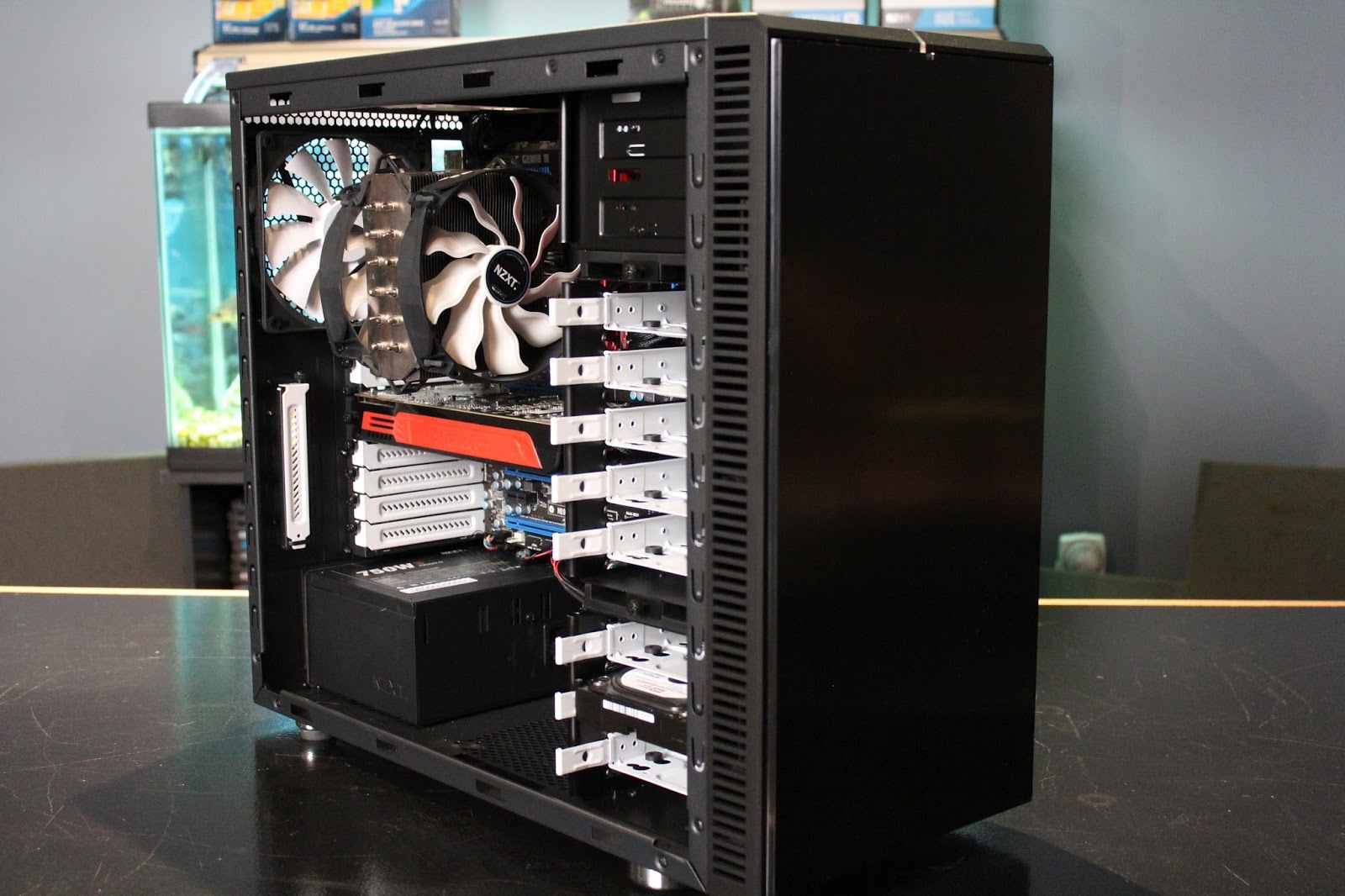
Right around the same time; this happened. An "orphan" found on the doorstep (OK, sitting outside my classroom door)..... a Fractal Design Define R4 missing the middle drive rack, but otherwise in good shape. What happened here, is that another of the Computer Club kids started working on a build and bought this case cheap (again off of CL) and decided to go another direction, so he brought it to me. So I took it home without knowing what I was going to do with it. Lucky thing I didn't name it! So, at this point, you can probably see where this is going, right? When I started working on this other machine, I noticed that not only was it an "ancient" (DDR2) based MB, but that the case was pretty much a low-end product with virtually no room for wire management, sound deadening, drive-trays or anything else that's the normal for today's mid-priced computers. As I'm pulling parts out of the old machine it becomes obvious to me that the "new" stuff doesn't need to go into the Thermaltake Commander, but instead into the Define R4! This stray would get to go to a "forever" home!


The rest is easy. I caught a sale at Micro Center this weekend on the Corsair CX650M PSU and SanDisk SSD Plus 240Gb totaling about $145 after taxes. While I was up there, I was even able to squeeze in a side-trip to pick up a GTX770 Reference Edition graphics card, but that's a different story not having to do with this build. (And now; back to the originally televised program). These items are a case of the right items at the right price, at the right time. He'll be able to use that Corsair PSU through multiple builds due to the 650 watts of 80Plus Bronze power and it has the added bonus of being a modular model so it can help keep the wiring cleaner. The SanDisk will be plenty fast and large enough for him to load not only the OS, but some of the software as well. I'll find him an old mechanical hard drive to put in there as additional storage along with an optical drive. They won't cost anything because I have them sitting around. Where does this thing stand right now? In actual money spent, it's run up to just over $200. Am I going to charge him for the case, and CPU. The answer is yes, in that a) this isn't a charity case, b) I want to get the Computer Club kid back his money and c) I want the friend's kid to have a sense of how much money he'd be spending if he did this all himself and what he'd end up with once the costs were all totaled. What is the total so far? Oh, I'd say about $150 or so would be fair for the MB, CPU and case, making his expenditure at roughly $300. What's left?


Memory and graphic card of course. RAM is easy. We'll do 8Gb because it's the default standard these days and you don't want to game with 4Gb, plus he can't afford 16Gb. End of discussion? Well..... there is the question of 2 sticks or 4. Logic dictates 2, but budget and planning ahead says 4. Why? 8Gb in 4 sticks is cheaper, but he won't be able to upgrade without loosing at least 2 sticks. But really, if and when he needs 16Gb, he'll be ready for another board/CPU combo anyway and in all probability, any new build will then run with DDR4 RAM, not the DDR3 that's this board uses. So, about $35 vs. $55, saving $20 here. Now on to the most difficult question to answer: which graphics card? nVidia GTX1050 vs. GTX1060. What? No love for "Team Red", what about the RX4x0 series that's so hot right now with the new drivers? We've already looked and we know that the games he wants to play are pretty much "green leaning". But that's not the only factor. The GTX1050 is a $100 card and even the "Ti" or "SC" versions can sometimes be had for around that figure if you watch the sales and rebates. When doing the research that I set him on, he came up with the 1060. Yup, he was right, in-so-much as it'll give him the ideal frame-rates at the highest amount of detail, yada, yada, yada. But here's the thing; the 1060s run about $225 to 250 which is a whole other paycheck for a kid working at Sonic. He's not really a first-person-shooter player, nor will he be trying to run 4K or VR anytime soon. So the 1050 would allow him to play what he wants decently without the cost creating an "unbalanced build" (too much money in some particular thing that doesn't give you the return on investment proportional to it's cost). Which brings on the final set of variables in this build.

For the foreseeable future, this will be his gaming monitor(s). Some old "throw-aways"..... because anyone can get these for free or close to it because they're old and small! Plus, we don't live in Highland Park where daddy will buy the kid a new 28" IPS, 1440p screen anyway (along with a new $3000 Alienware)! So, after this stuff gets paid for, he can start gaming while saving up to pick up 22-24", 5ms one or two Asus/Acer/Dell screens that appear on Craigslist daily for $40-50. In the meantime, he can play.

This question can (and should) also be answered at a later date as well. He'll start out with old Dell "rubber-domed" keyboard and throw-away mouse that's everywhere. The questions of whether Cherry MX "Brown" is superior to "Purple" can wait. I typically advise kids like this to play and learn what they like and what they don't like. Then ask for the specific keyboard and/or mouse for their birthday or Christmas presents from relatives (parents/grand parents) because, they probably can't/won't buy you the whole computer, might feel weird about simply giving you money, but will be happy to walk into a store if they know exactly the thing you want (if you tell them where to buy it). Or better yet; Amazon.

At the end of the day, what we'll have a an under $500 (about $450) build that will allow this kid to play the games that he wants to play, right now. He'll have a number of component that he can grow with such as the case, power supply and SSD so he won't have to do it all at once again unless he really wants to. Having options is a good thing!
You might be wondering what's going to happen to the old computer in a cheap case he brought, that I decided not to use....... stay tuned for Part 2.
So...No, this is not a post about a flying dragon-dog, it's actually another episode in the long drawn out agonizing story of my server rebuild.
When last we visited my version of the "100 Years War" (really 116 years), I had changed directions with the motherboard, and moved on to the much newer version of a Supermicro server board based on the LGA-1155. It has subsequently gotten a low powered Xeon processor, and matching 8Gb of ECC memory. All this along with the installation of 6, 2Tb drives and the PSU, you'd think that I'd have been done and moved on by now.

Then, I got hung up on this.... OK, there's been other stuff like my garage workshop, but this has been a head-scratcher for me. Oh, not of the can't figure it out variety, but of the "do I really want to do this" sort. "This" is an Icy Dock Black Vortex 4-in-3 drive cage. The concept being that you can stick one of these things in 3, 5.25" drive spaces and give yourself 4, 3.5" drive bays that are actively cooled with a 120mm fan. It's a pretty cool (no pun intended) concept, and it would give me expansion in the ridiculously large Fractal XL R2 case that has 4, 5.25" bays in it. Unfortunately, this thing requires that the drive mounting tabs that hold those 4 drives would need to be cut off or bent back out of the way. That bothered me. Don't ask me why, but permanently altering this hither-to unmolested case was not something I wanted to do. So, there it sat. The XL R2, with the Icy Dock sitting on top of it in my office for the last 2 months.

Then, I bought another case. Looks familiar doesn't it? Looks kind of like the Silverstone PS-07 that the old server was built in doesn't it? That's because it's a Silverstone CS380.
There it is for reference. The difference? Despite it's shape, it's NOT Micro-ATX. It's a full-sized ATX case, with....
8 drive-bays.....
on a "hot-sway" back-plane! And don't forget the on-board dual 120mm cooling fans for the drives. Despite the off-the-shelf ability to hold the same number of drives, this case is fully 7" shorter than the XL R2! Given where it's going to go in my office (inside a cabinet), this is a much better solution. No, the Icy Dock won't fit, but hey..... I'll find a place for it to go. Time to finish this build!
This year, for Spring Break; we're planning on going to Washington DC. This has been on the docket for some time now and "come hell or high water", we're going! As it works out, with children 3 years apart, here in the state of Texas, both of them are taking some version of American History in school, so it's the most obvious time to go. We sure don't want to go in the summer. Nobody wants to be in DC during that time of year!
One of the obvious things about any trip there is that there'll be lots of pictures taken. I know what you're thinking! He's going to talk about replacing his camera..... ah..... no..... Doh! Let me go ahead and say that I evaluated this strategy long and hard.
The Olympus Pen-F has had me salivating for some time now. Just think about it: it's up-to-date current state-of-the-art, it's new and stunning. I could channel my long forgotten inner "range-finder" camera street photographer..... Besides, it's way smaller than the beast!!!
Let's cut to the chase. At the end of the day, my old Nikon D300 with the 18-200mm lens mounted can shoot virtually every photo I need to shoot. When I do my part, it can shoot them all well. I have pretty much all the lenses I need and I own it. Don't have to buy a thing!
Except this. What the D300 can't do is video, nor can it remake itself into something that can go anywhere inside a pocket. If those of you with long memories think this reminds you of my short affair with the Panasonic GF1, you'd be close.... but no cigar.
Here are the 2 cameras compared. You can easily put the LX5 in a jacket pocket or even some pants pockets, but certainly not the GF1. Even when it has the 20mm pancake lens on and the VF-1 viewfinder off. Where the GF1 can rightfully have "big camera" pretensions with it's Micro 4/3rds sensor, the LX5 is a compact from the ground up with a sensor a quarter of the size. However, with the resolution at 10 Megapixels, it does a nice job without a lot of noise... unless you get frisky with the ISO! It's main calling cards?
It can go anywhere and not call attention to itself, very unlike the huge D300!
It's lens starts at a 35mm equivalent of 24mm! With lots of inside (yet panoramic) photo opportunities such as above in DC, it's pretty much be with me the whole time.
Would I love to get a new camera? YES! Would I love the new Olympus? YESSSSS!!! Do I need it? Can I get done what needs to be done with what I have? Will switching systems fix the thing that the D300 can't do? Ahhh.... No...... Sometimes you just have to be satisfied with what you have and do the cheap fix. Yup; it was cheap. I picked up my slightly beat up LX5 off of Craigslist for $95. Yes, I had to jump through hoops, meaning that I had to get a former student who's going to school down in Waco to pick it up after giving the money to her brother to give to her mom to deposit in her account! But hey. Problem solved..... frugally.