skip to main |
skip to sidebar
You might be wondering; what does one have to do with the other? That probably means that you haven't had the pleasure of attending one of these little shindigs. Mostly, at these annual events, you get dressed up, take your daughter to dinner, get to the dance where she runs off with her friends and spends the evening running, jumping, and squealing while the dads stand around watching and chatting with each other. Of course, there are a few dances where the daughter will appear out of the crowd and claim you for a few minutes..... then off she'll go again!

This year, while I'm doing my "wall-flower" imitation, one of my daughter's friend's dads started telling my about his 16 year-old son's computer woes. As you can imagine, this happens to me a lot around here. It started with this, an Asus X553m notebook computer. That which is of a class of machine that I despise the most: oh no, not the brand or model per se, bu the type...... the lowest of the low.... the $300-400 laptop. This one was worse than most. Again, not so much the make or model, but that they had bought it as a machine to be used for school and gaming! This machine is a wretched choice for either of these functions. Not transportable enough for the former and not powerful enough for the latter. So predictably, it was "broken":
- It's Windows 8......
- It's cheap...... in every sense of the word
- Neither the kid (nor the parents) know what they are doing so it's loaded up with malware etc.
- In his frustration, had banged hard enough on the keyboard to cause some permanent damage thus requiring replacement. We're hoping that it's the cable and not the connector on the motherboard! If I'm right, it'll be a $30 fix.
So, these being our family friends, and having pity on their computing woes, I told them to bring over the offending hardware..... and this is where things went sideways..... ah get interesting.....
So, one Sunday afternoon, they came. I was expecting the laptop, but several trips back to the car, along with a bunch of unnecessary items (monitor, keyboard, cables, etc.) later a Thermaltake Commander Series case in "Snow Edition" showed up as well.... So here's the story. Apparently, at some point; an accommodating family uncle, knowing that his nephew wanted to game, gathered up some old PC parts and put them in this cheap "gaming" case for him. Oh, make no mistake; it's a cheap case and not just a case of me being hyper-critical! This created a whole new dynamic to the original issue, so let me digress......

Warning! Soapbox Rant Impending; 10, 9, 8 ......... 1, ignition! This is one of the dumbest ideas out there!!! No, no, not the Razer Pro! The product isn't the issue..... it's the concept..... at least for most people, but especially for a student close to or of college age. I've got no issue with gaming, in fact, I'm of the strong belief that it's greatly responsible for driving the industry forward. And gaming encompasses the vast majority of teenage boys and an increasing percentage of young ladies as well. Yet, despite the advances made in mobile computing the "gaming laptop" simply isn't a good option for people of average income. Here's the thing; if you want to do mobile gaming in a satisfactory manner, you don't have a ton of options. You can do Razer, Alienware, Asus ROG, Acer Predator, or MSI Titan Pro. With a few notable bargains such as the Lenovo "Y" series machine, you're really in the $1500-2000+ end of the laptop pool. At issue, is that you can generally replicated the exact (or better) abilities of these machine for half the cost in a desktop! So......yeah.......

So..... don't buy a laptop; buy a desktop!?! Uh..... again...... NO! In today's world, it's not really an "or", it's an "and" proposition.
It's really, more this scenario. A desktop machine that's a primary workstation which does everything from game to video editing (aka the heavy lifting). Then the laptop would serve as mobile computing, or a secondary device while the primary rig is doing a job like rendering video, etc. So, how are we getting our friend's kid to this ideal? The laptop part is easy: "it is what it is", he owns it and once it's been fixed and cleaned up, it will serve the purpose just fine till he's ready to upgrade.

The answer to his problem started months ago, right here. You guys are already aware that my brother will out-of-the-blue, send me random things that are still usable, but that he has no use for..... case in point..... this AMD FX 4170 processor. It's a 4 core, CPU from the "Zambezi" series of their "Bulldozer" architecture. So, several years old, but still very usable if your aren't doing much high-end processor oriented work (which is a lot of games). The problem is that other than with HTPCs, my fleet tends to be rather an Intel shop. Not only did I not have a free AMD socketed board, but certainly, not a high end socket AM3+ board. My brother had gotten it virtually for free, but didn't know whether it worked. So it sat for months in the closet of doom, till I remembered that one of the Computer Club students had a relatively recent AMD build. Sure enough, it was AM3+ socket, so I asked him to test out that CPU. I certainly didn't want to invest $50 to $100 on a board and find out that the processor was bad! He found that it wasn't, so a few weeks ago, I found an appropriate board on Craigslist.

Not just a board, but a really nice Gigabyte GA-990FXA-UD3. You don't have to know this board , just note the extensive heatsinks around the socket, and you can ascertain a lot about it. I got the price down to $60.

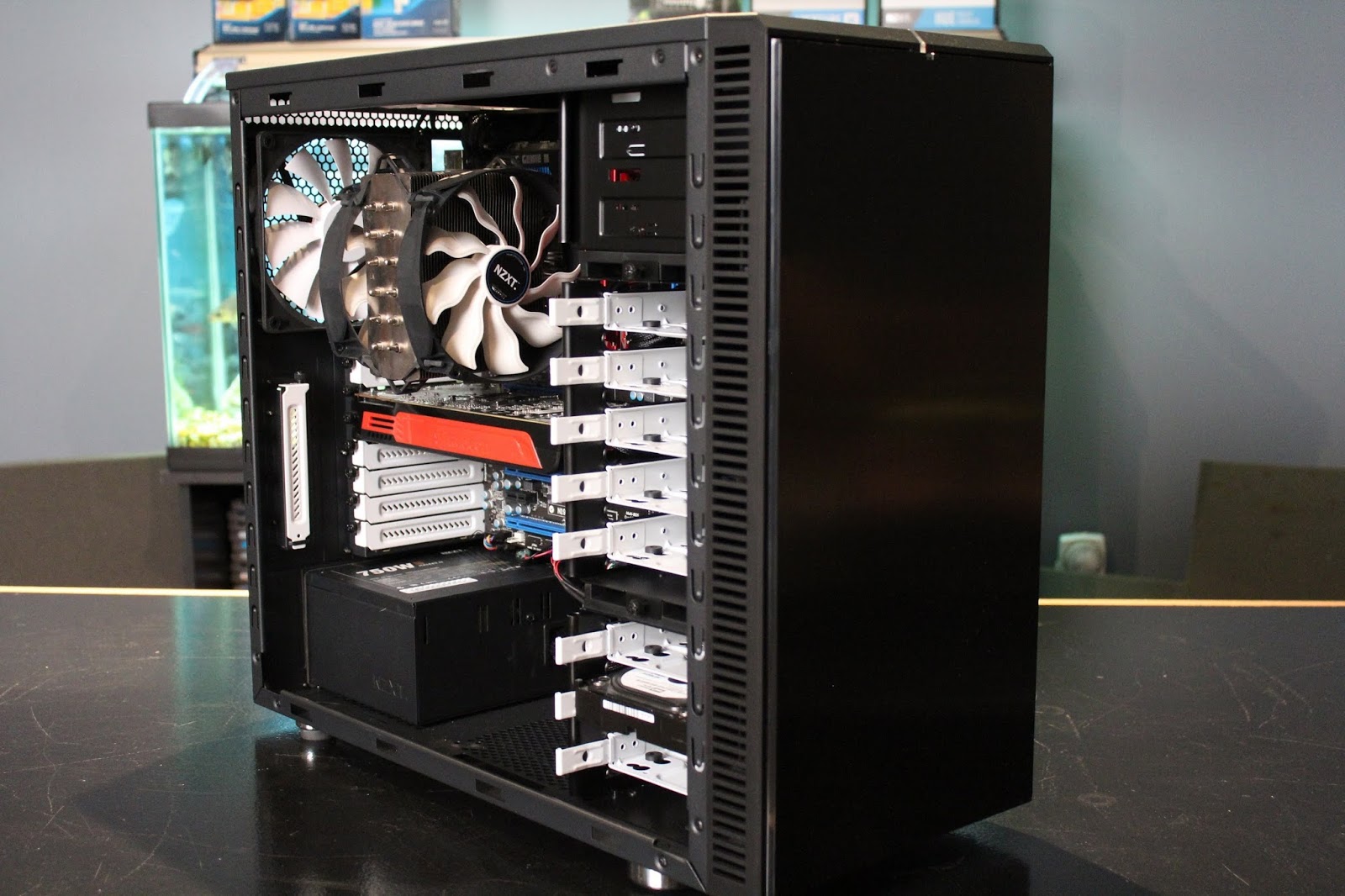
Right around the same time; this happened. An "orphan" found on the doorstep (OK, sitting outside my classroom door)..... a Fractal Design Define R4 missing the middle drive rack, but otherwise in good shape. What happened here, is that another of the Computer Club kids started working on a build and bought this case cheap (again off of CL) and decided to go another direction, so he brought it to me. So I took it home without knowing what I was going to do with it. Lucky thing I didn't name it! So, at this point, you can probably see where this is going, right? When I started working on this other machine, I noticed that not only was it an "ancient" (DDR2) based MB, but that the case was pretty much a low-end product with virtually no room for wire management, sound deadening, drive-trays or anything else that's the normal for today's mid-priced computers. As I'm pulling parts out of the old machine it becomes obvious to me that the "new" stuff doesn't need to go into the Thermaltake Commander, but instead into the Define R4! This stray would get to go to a "forever" home!


The rest is easy. I caught a sale at Micro Center this weekend on the Corsair CX650M PSU and SanDisk SSD Plus 240Gb totaling about $145 after taxes. While I was up there, I was even able to squeeze in a side-trip to pick up a GTX770 Reference Edition graphics card, but that's a different story not having to do with this build. (And now; back to the originally televised program). These items are a case of the right items at the right price, at the right time. He'll be able to use that Corsair PSU through multiple builds due to the 650 watts of 80Plus Bronze power and it has the added bonus of being a modular model so it can help keep the wiring cleaner. The SanDisk will be plenty fast and large enough for him to load not only the OS, but some of the software as well. I'll find him an old mechanical hard drive to put in there as additional storage along with an optical drive. They won't cost anything because I have them sitting around. Where does this thing stand right now? In actual money spent, it's run up to just over $200. Am I going to charge him for the case, and CPU. The answer is yes, in that a) this isn't a charity case, b) I want to get the Computer Club kid back his money and c) I want the friend's kid to have a sense of how much money he'd be spending if he did this all himself and what he'd end up with once the costs were all totaled. What is the total so far? Oh, I'd say about $150 or so would be fair for the MB, CPU and case, making his expenditure at roughly $300. What's left?


Memory and graphic card of course. RAM is easy. We'll do 8Gb because it's the default standard these days and you don't want to game with 4Gb, plus he can't afford 16Gb. End of discussion? Well..... there is the question of 2 sticks or 4. Logic dictates 2, but budget and planning ahead says 4. Why? 8Gb in 4 sticks is cheaper, but he won't be able to upgrade without loosing at least 2 sticks. But really, if and when he needs 16Gb, he'll be ready for another board/CPU combo anyway and in all probability, any new build will then run with DDR4 RAM, not the DDR3 that's this board uses. So, about $35 vs. $55, saving $20 here. Now on to the most difficult question to answer: which graphics card? nVidia GTX1050 vs. GTX1060. What? No love for "Team Red", what about the RX4x0 series that's so hot right now with the new drivers? We've already looked and we know that the games he wants to play are pretty much "green leaning". But that's not the only factor. The GTX1050 is a $100 card and even the "Ti" or "SC" versions can sometimes be had for around that figure if you watch the sales and rebates. When doing the research that I set him on, he came up with the 1060. Yup, he was right, in-so-much as it'll give him the ideal frame-rates at the highest amount of detail, yada, yada, yada. But here's the thing; the 1060s run about $225 to 250 which is a whole other paycheck for a kid working at Sonic. He's not really a first-person-shooter player, nor will he be trying to run 4K or VR anytime soon. So the 1050 would allow him to play what he wants decently without the cost creating an "unbalanced build" (too much money in some particular thing that doesn't give you the return on investment proportional to it's cost). Which brings on the final set of variables in this build.

For the foreseeable future, this will be his gaming monitor(s). Some old "throw-aways"..... because anyone can get these for free or close to it because they're old and small! Plus, we don't live in Highland Park where daddy will buy the kid a new 28" IPS, 1440p screen anyway (along with a new $3000 Alienware)! So, after this stuff gets paid for, he can start gaming while saving up to pick up 22-24", 5ms one or two Asus/Acer/Dell screens that appear on Craigslist daily for $40-50. In the meantime, he can play.

This question can (and should) also be answered at a later date as well. He'll start out with old Dell "rubber-domed" keyboard and throw-away mouse that's everywhere. The questions of whether Cherry MX "Brown" is superior to "Purple" can wait. I typically advise kids like this to play and learn what they like and what they don't like. Then ask for the specific keyboard and/or mouse for their birthday or Christmas presents from relatives (parents/grand parents) because, they probably can't/won't buy you the whole computer, might feel weird about simply giving you money, but will be happy to walk into a store if they know exactly the thing you want (if you tell them where to buy it). Or better yet; Amazon.

At the end of the day, what we'll have a an under $500 (about $450) build that will allow this kid to play the games that he wants to play, right now. He'll have a number of component that he can grow with such as the case, power supply and SSD so he won't have to do it all at once again unless he really wants to. Having options is a good thing!
You might be wondering what's going to happen to the old computer in a cheap case he brought, that I decided not to use....... stay tuned for Part 2.
It's almost upon us....the most dreaded day of the year......Black Friday!!! This year is going to be extra dreadful. Black Friday combined with.....B.Y.O.D. That's bring your own device for the uninitiated. I'm not sure how it is in other parts of the country (but I suspect that it's about the same), schools have decided to get out of the technology hardware game and have largely embraced the B.Y.O.D. concept in some form. It's simply moving too fast for the institutions to keep up with it, plus it's so pervasive that most students either have it already or are acquiring it eminently. So even schools like mine which had been on the cutting edge by providing laptop computers are bowing to this irresistible force of technology.

What has also become apparent is that many parents played the "wait and see" game to determine how much their children were going to need to use technology and how the schools were going to implement it before running out and buying something. Well, I'm going to bet that they've seen enough to now "make the call". So, either they, the grandparents, Santa, or whoever is going to make a major run on these things during this year's holiday buying season.

Although, B.Y.O.D. doesn't necessarily define it's technology to mean tablets, and sometimes, that's not even the best device for the child; I'm going to bet that they will be the majority of what's purchased this year. There's a number of reasons, but this post isn't about deciding between them, although I might feel the need to write one on that later. This post is about the parameters that make up the decision making process of choosing a tablet. Of course, I'll have to put the caveat out there that the information is for what's currently out now (Nov. 2013), and of course to some degree will be effected by my philosophies and biases. That's out of the way; let's get down to it!
No; that's not me. That is of course, the great Steve. And for many who have just paid attention to their awesome ad campaigns and drank the Apple "Juice" (Kool-Aid to some), you'd think that all anyone needed to do is to run out and buy one of their Uber-Cool devices and have done with it.
Of course, I'm a technological heretic and am here to tell you, it's not that simple. In today's tablet world, there are 3 main forces in play. Apple "IOS" (iPhone, iPad, iBlender, iDryer, yada-yada-yada, ad nauseum), Android (Pretty much any non-Apple Smartphone and Tablet) and new to the game; Windows (Actually Windows 8, phones and tablets). All three, have their strengths and weaknesses and I'll go through them one by one.

There's that man again! Well; that's because he/they invented the modern category of the tablet as we know it, with the original iPad of April, 2010. First, let's eliminate that from your buying consideration, no matter how great of a deal that "Uncle Ross/Aunt Judy" is offering you for their "almost-new" one....don't buy it! This first version of this product simply won't run many of the modern apps on it's IOS 5 which can't ever be updated to a newer version...end of story. Trust me; we have one. However, the iPad 2 (oddly still in production) will run the up-to-date versions of IOS, but just slower then the newest wiz-bang iPad "Air" which has the super-duper-secret-alien technology screen. In all seriousness though, any and all iPads are technologically cutting edge, and function virtually flawlessly and get great battery life. The down side is that they are generally more expensive than others with the current models starting at $399 and going up from there. Best bet in Apples (vs. Oranges ...padump) is the iPad 2 which sells down around $350. Your kids won't be able to tell the difference in the speed of the hardware between it and the more expensive versions. Are there downsides to iPads? Yup; IOS isn't as "open" as Andriod and therefore, some APPs don't have an IOS version. So if you are getting it specifically with the intention of your kid using it in school, I'd absolutely check to make sure whether there's an IOS version of the APP that their teacher(s) are looking to use! Plus, for all it's cutting edge technologies, Apple products are not often friends with otherwise "common" ports like USB, card readers, etc. You'll have to buy a separate device to say.....connect your digital camera or flash drive. Believe me, I've felt this pain. Oh yeah, almost forgot; if you are looking for a smaller version, the iPad "Mini" starts at $280. Also almost forgot; there's a dark secret about IOS devices that they don't like to talk about. They won't run anything with Adobe Flash. What's that you ask? Well kiddies....it's those fun little videos and other automated gizmos that are on everybody's websites these days ranging from just plain news sites to (unfortunately) many educational sites as well! Not trying to Apple-bash, just lettin' you know one of the issues Apple-philes have to deal with.

The other "heavy-hitter" in the tablet market are the various Android tablets. It doesn't matter whether you are looking at a Nabi, the Kindle, or the ubiquitous Samsung Galaxy Tab 2 or 3, they are all based on Google's little adaptation of the Linux OS we all know as the Android. Let's start with the basics before it gets complicated. Don't buy the little cheap ones that you see advertised at places like Big Lots for something in the order of $50-70. Just don't do it. They often run an old, designed for smartphones, version of the OS that runs on a single core processor. An older OS, means that besides it not having the newer improvements and features, but that it also won't run some APPs. A single core processor means that it can't be upgraded to a new OS either. In general, if you are looking for a "budget" tablet in the sub-$200 range, look for an older major brand, like Samsung, Asus, or Acer with at least a "Dual-Core" processor. You won't get the nicer HD screen, or much memory, but it'll be enough to run what you want to.

What about the next group "up"? $250 or so? In that case, you really want to start with "Quad-Core" processor and a HD screen. What does that mean? It means that you'll be able to make this tablet last a little longer, because not only will it run what's out there now very nicely, but probably the next-gen OS and APPs that haven't been released yet. And if you haven't gone to a store and held an HD screen'd tablet side-by-side with a non-HD screen'd one; go do it and see what I'm talking about.

What about the other one? Oh yeah; Microsoft Surface, running Windows 8 or 8 RT depending on whether you paid for the expensive version. I'll say this: if you have a high school or maybe a middle school kid who wants something light and physically smaller, then consider this. It's largely because these are better for content creation (read writing papers) than any tablet, even the big ones. However, I'll also say that I'd sooner buy a used ultra-portable laptop than shell out about $500 for one of these. $200 vs. $500, real keyboard vs. membrane kinda keyboard.....you decide.
Still confused and would like me to be more specific? Want me to make some recommendations? OK, I'll do that....along with some things to think about as well.
- Apple families; you know who you are. You've gone through several generations of iphones. Mom and/or Dad have an iPad, maybe a MacBook? I'd look long and hard a the Mini for your kid unless there are reasons which can't be overcome. Here's the deal. It may be your kid's tablet, but when they can't find something or want to change a setting, you're going to want to know where that is. When you are traveling somewhere, you'll want everyone to be able to use the same chargers...trust me on this.
- Budget driven folks; for whatever reason, you need a functional tablet, but simply can't or won't go over a price-point. The lowest price-point, I can recommend if you really can't do $225, is $175. At this price, you can buy a decent machine branded by a decent company that will be probably be there for the duration of the warranty and won't have turned into "makers" of vacuum cleaners. The older model of the Samsungs, the Galaxy Tab 2, is available at lots of places around $179. HP has a tablet about around $150 that has good specs, but it's build quality is not very good. I'd look for one of the old Asus ME tablets. You might get lucky and get one with a nicer screen. Make sure that the Android OS is 4.xx "Ice Cream Sandwich" or newer. Try to get one with a MicroSD card slot so you can put a memory card in there to augment the low amount of memory that comes with tablets in this price range (typically 8Gb).
- Bang For The Buck Buyers; look to spend $225-275. The Nexus 7 HD, whether you buy the Google version (made by Asus) or the Asus version (made by Asus) are really great deals right now. They typically sell at $229. The hardware is very nice, the screen is excellent and it's well-made. Personally, if I wasn't as price-sensitive, I'd look for one of the Asus models that has the MicroSD card readers although it's not as big of an issue here since most of these tablets will come with 16Gb of memory on board. But hey, it's always nice to be prepared, especially if you travel a lot and want to put a bunch of movies on there for your kid.
- Beyond this price point, you are mostly paying for extras that are very user specific. These are things such as a docking keyboard, extra-super-duper fancy camera, bigger screen, other things that kids don't need. Also, buy a 7" tablet. You'll/They'll appreciate the way more convenient smaller size. You'll appreciate the smaller price as well.

But what about Nabis and Kindles!?! Here's the deal on those. I wouldn't generally recommend either of them for the same philosophical reason and different real-world reasons. I don't like products that are specifically "limited". Since Android is basically an "open" standard, manufacturers can basically do with it what they want. Some, based on what market segment they are trying to sell to, will create a "walled garden" so only certain APPs are available for their product. This is all fine and good you have a young child, but create issues if you have a school-aged kid who will have different needs as they grow. In the Nabi's case (literally), they've essentially added a silicone case to the case. That might be a good thing if you have a younger kid or a particularly accident-prone one, but I'd suspect that it would be a bit of an issue to put in the typically over-stuffed book-bag though. Both the Kindle Fire, and Blackberry playbook are really nice devices, however, they both limit their users to specific subsets of Android Apps available or worse yet, their own Apps. Just ask HP how that one worked out! Nook? See above. But in the end, what the issue ends up being is that, if their specific adaptations aren't exactly what you need, then not only do they not offer any more for your money, but end up limiting what you can do with it in the long run.

A few last notes and items to address before closing out this post. What about a phone? Your kid may campaign for one, but the simple fact is that they really don't have big enough screens to do any sort of real work on. They are also often too small to allow the user to make accurate button presses on some of the curriculum specific practice apps. Plus, since they are often tied to the data side of your cellphone plan, do you really want to trust that your kid is going to go through the extra step to make sure that they've logged on to the schools WiFi network vs. being still tied to the cell tower sucking down your data minutes? Really? You do actually know your 8, 9 or 10 year old, right? Yeah, that's what I thought.

"So, which size do I buy?" I'll make it easy. Unless you have specific needs, buy the 7" or as close to that size as possible. It's small enough to make it easy to throw in a bag, but it's big enough to read for an extended time and see things without squinting. If you can afford it, get one with Gorilla Glass, much less likely to break when your child throws it. Again, if it fits in your budget, I'd try to get one with a MicroSD card reader (memory cards are cheap). For your sanity, get them decent headphones, and a car-USB adapter (make sure that it'll support the electrical draw of a tablet though; about 2amps). Get a decent case that has a hard cover over the screen. You've seen the inside of your child's book bag, right? .....and have seen how they throw that around?

Where to buy? OK, let me start by saying that I'm not supported by any company in any way shape or form. I share with you what I do based on hard-won experience and my partially tough-in-cheek eccentricities. If there's a Micro Center in your area; print out this post and go there. They have a lot of stuff so you need to give yourself some time. Go on a weeknight or the middle of a weekday. Do not go on Saturday any time around and after noon. Same for Sunday. I like them because unlike other places, their staff seems to know what they are talking about. I like that. They also tend to hire people that actually speak good English. I also like that. But they are physically much smaller than a Fry's so they'll often get crowded. I go to Fry's sometimes, when I feel like being alone. Unless you are like me; don't go. Or expect that no one will help you. You (or they) won't be able to find what you want (the thing in the ad) since they sold both of them within minutes of the Friday ad coming out. I prefer not to go to Walmart or Best Buy for obvious reasons. Although Best Buy usually has lots of stuff out, and is a good place to just go and look at the models. Expect no useful help, unless it's a full-moon and on an alternate Thursday during a Leap-year. I'd sooner go to Walmart, although you won't think that they have what you are looking for since it won't be on display and you won't be able to see it locked behind the expanded steel-mesh cage at ankle level. The one kid who knows stuff won't be working on the day you go there. Amazon is a better bet.
If you've never had it happen, then you're either incredibly blessed or haven't worked with computers long enough! Saturday, while working on my project of ripping some movies for the children to play on their new tablets during the pending loooong car trip, my computer died.....spectacularly I might add. Well, it flashed, then when it came back up, the boot drive wasn't recognized at all. I'd say that's more spectacular then the run-of-the-mill, blue-screen or missing/corrupt NT bootstrap file. So anyway, the 6 month (or so) old Mushkin Chronos is somehow toast. I contacted Mushkin today and getting an RMA for it.

So, the question became, do I just wait for the RMA and have my main rig down for a week or two? I decided the answer was "no", we go on to the "if-then" question. Which is, should I replace it with a bigger drive for the similar cost of the original. Other than the 240Gb drives like the one I put in my wife's T61 which run about ~$170, there was the always bulletproof Intel 330 which Micro Center was selling for $150 (same as Newegg), or do I go the cheap way and buy a small 60Gb for something like $60-80.
I'm standing in front of the big case of SSDs at Micro Center this morning pondering the issue, when I noticed way down in the lower corner a generic looking SSD with no sign. I asked about it, and the sales guy says that it's a Dell 50Gb SSD that they made a special deal with Dell to liquidate them. After checking, he said that it was $34.99, but they had just lowered it for "Black Friday" sales to $29.99, and that it was actually OEM'd by Samsung. SOLD!!!
So, yes, I'm sitting at the workstation typing this out on this temporary SSD. Now the question is going to be: what do I do with a little 50Gb SSD when the Mushkin comes back?